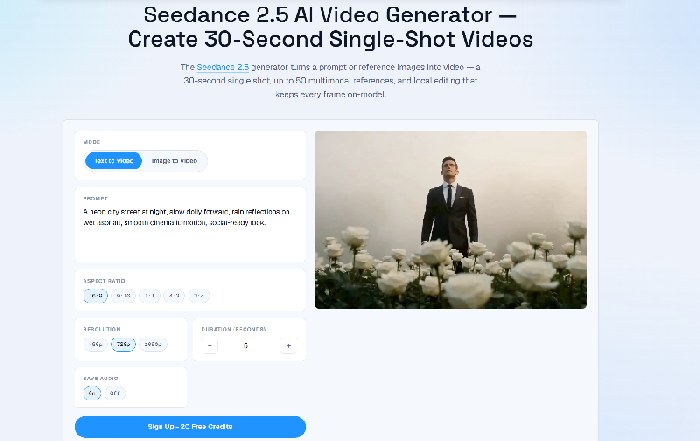
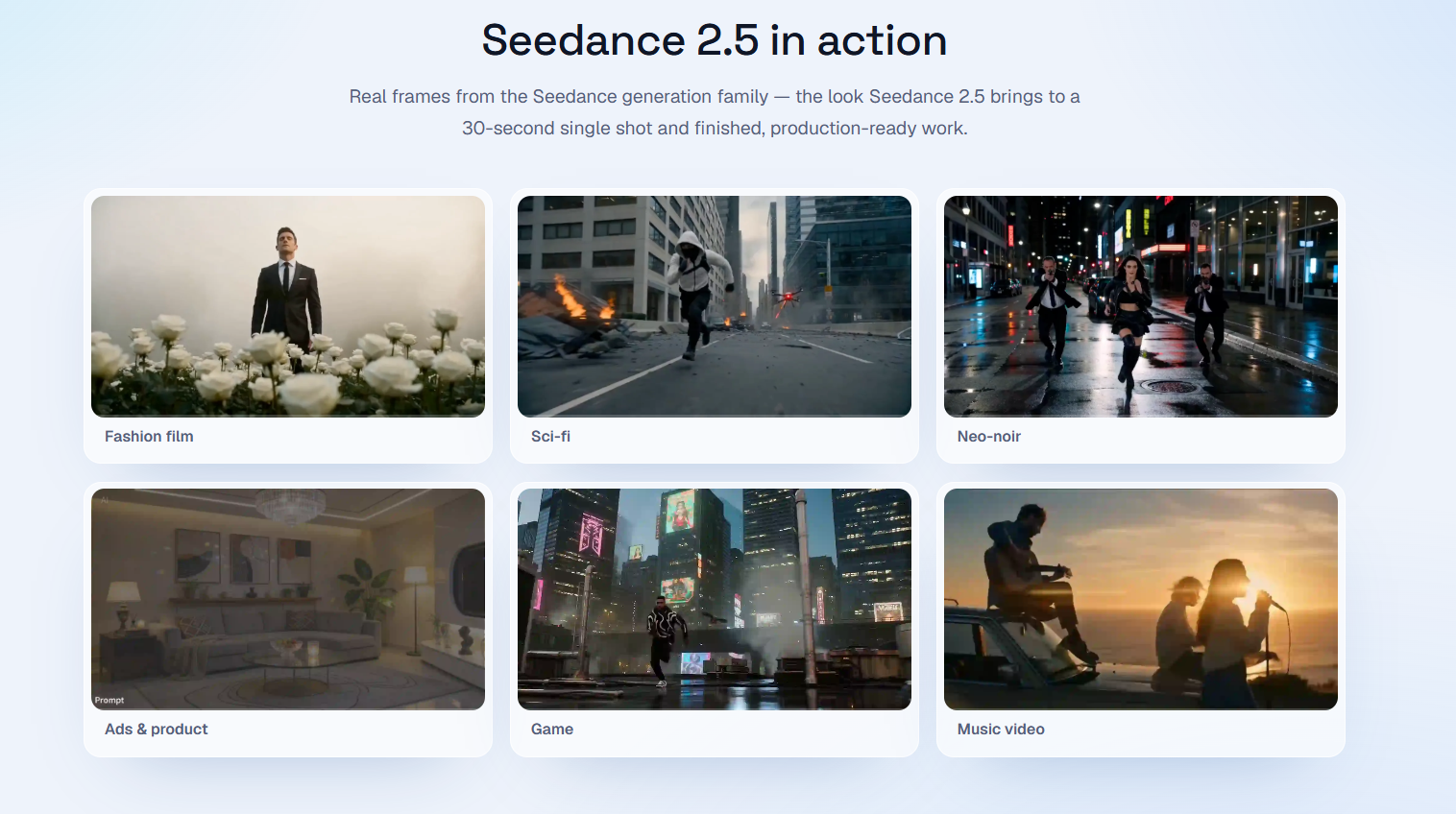
Seedance 2.5 represents ByteDance's entry into the competitive AI video generation space, positioning itself as a production-ready tool for creators who need longer, coherent video outputs. Unlike many AI video generators that produce fragmented 4-8 second clips requiring manual stitching, Seedance 2.5 promises native 30-second continuous takes at 4K resolution-all within a browser-based interface that requires no installation or GPU setup.
The platform targets professional creators, marketers, filmmakers, and social media producers who have grown frustrated with the "generate and hope" workflow of earlier AI video tools. By emphasizing consistency across the full 30-second runtime and supporting up to 50 multimodal references, Seedance 2.5 suggests a shift from random output generation to something more akin to directed production.
Seedance 2.5 delivers several technical capabilities designed to address common frustrations with AI video generation:
30-Second Continuous Native Output: The platform generates complete, continuous shots rather than short fragments requiring manual stitching. This native length, combined with maintained character identity and coherent environments across the full take, suggests a significant advancement over earlier tools that struggled with continuity.
Native 4K Resolution: All outputs render at native 4K without requiring a separate upscaling pass. The site emphasizes this is genuine native resolution rather than scaled-up lower-resolution generation.
Up to 50 Multimodal References: Users can incorporate text, images, audio, video, and other reference materials into a single generation-up to 50 references total. This deep reference set aims to solve consistency problems by giving the model substantial context for character appearance, environmental details, and stylistic parameters.
Region-Level Local Editing: Rather than regenerating entire clips when adjustments are needed, Seedance 2.5 supports local editing that preserves the broader composition while revising specific regions. This shifts the workflow from "re-roll and hope" to directed revision.
Text-to-Video and Image-to-Video: The platform accepts both written prompts and reference images as starting points, with image input preserving composition, identity, products, and style during animation.
Multiple Aspect Ratios: Support for 16:9, 9:16, 1:1, and other common aspect ratios allows targeting different distribution platforms without cropping or letterboxing.
Browser-Based Operation: No model download or GPU setup required-everything runs in the browser with a console that unifies text-to-video and image-to-video workflows.
Based on the public site evidence, Seedance 2.5 serves several distinct professional applications:
Advertising and Commercial Production: The platform explicitly markets itself for ads and product visualization, where brand consistency and finished quality matter. The 30-second runtime matches common ad formats, and the reference system allows locking in product details and brand characters across the full clip.
Filmmaking and Pre-Visualization: For filmmakers, Seedance 2.5 offers rapid scene prototyping and pre-viz capabilities. The ability to describe camera movements in natural language ("slow dolly forward") and receive coherent 30-second takes could significantly accelerate early production phases.
Social Media Content: With native support for vertical 9:16 aspect ratio and 30-second duration, the platform aligns with TikTok, Reels, and Shorts formats. The showcase includes fashion, sci-fi, action, and gaming content categories.
Educational and Storytelling Content: Beyond commercial applications, the site suggests use for education and narrative storytelling-applications where coherent scene continuity matters more than rapid-fire clip generation.
Fashion and Lifestyle: The showcase explicitly highlights fashion content, suggesting the platform handles fabric movement, lighting consistency, and model appearance with sufficient fidelity for fashion marketing.
Seedance 2.5 operates on a credit-based system with per-second billing rather than subscription tiers. New accounts receive 20 free signup credits to evaluate the platform.
Starter Pack - $9.90
Creator Pack - Most Popular
Pro Pack
Studio Pack
Billing Mechanics: Generation costs scale by the second of output duration. The site emphasizes this matters for short-form work where flat per-clip pricing would punish quick tests. Users can iterate cheaply at lower resolutions (480p or 720p on Seedance 2.0 Fast), then re-run keepers at full 1080p once direction is locked.
Credit System: Credits never expire, eliminating pressure to use them within arbitrary timeframes. The same balance works across every model tier (2.0 Fast, 2.0, 1.5 Pro), so users don't need separate credit pools for different generation modes.
Seedance 2.5 emphasizes accessibility through its browser-based architecture-no installation, no GPU requirements, and immediate availability after account creation. The interface presents a unified console for both text-to-video and image-to-video workflows.
The platform provides several learning resources:
Specific support channels are not prominently detailed on the public pages, though the presence of documentation and review content suggests some level of self-service support. Users requiring direct assistance should verify available support options before committing to larger credit purchases.
Seedance 2.5 operates entirely in-browser with server-side processing. Technical specifications from the public site include:
Available Models:
Supported Resolutions: 480p, 720p, 1080p, and native 4K across all model tiers.
Generation Time: The site notes most users complete the workflow from blank brief to finished 30-second 4K clip in about 10 minutes, or 5 minutes for simpler briefs.
Reference Handling: The system accepts up to 50 multimodal references including images, video clips, audio files, and text descriptions-each tagged by role to prevent bleeding between reference types.
Smart Prompt Feature: Optional translation and refinement of user prompts to optimize generation results.
Output Format: Finished clips export as MP4 files ready for direct use or integration into larger editing workflows.
Pros
Cons
Seedance 2.5 emphasizes production-ready output with 30-second continuous takes, native 4K resolution, and up to 50 multimodal references. Earlier tools often produced 4-8 second fragments requiring manual stitching, with consistency issues across segments. The platform also introduces region-level editing for directed revision rather than complete regeneration.
No. Seedance 2.5 runs entirely in the browser with server-side processing. You only need a modern web browser and internet connection-no model downloads, no GPU setup, and no local storage requirements for the AI models.
Generation is billed by the second of output duration. The Starter pack ($9.90) provides 400 credits generating approximately 50 seconds of 720p video on the Fast tier. Credits never expire, and the same balance works across Seedance 2.0 Fast, 2.0, and 1.5 Pro models. You can iterate cheaply at lower resolutions, then re-run successful outputs at full quality.
Yes. The platform explicitly positions itself for commercial creative work including ads, brand content, and client deliverables. However, users should verify specific licensing terms on the official site before using outputs for commercial purposes.
The platform accepts text prompts, images (JPEG, PNG, etc.), video clips, and audio files as references-up to 50 total per generation. Images can serve as composition, style, or character references while preserving identity and products.
Yes. New accounts receive 20 free signup credits to test the platform. The site notes this is enough for initial experimentation with the workflow before purchasing credit packs.
Most users complete the workflow from blank brief to finished 30-second 4K clip in approximately 10 minutes, or about 5 minutes for simpler prompts. Actual generation time varies by queue status and selected resolution.
Seedance 2.5 supports 16:9 (landscape), 9:16 (vertical), 1:1 (square), and other common aspect ratios suitable for various distribution platforms including YouTube, TikTok, Instagram, and traditional broadcast.
Seedance 2.5 presents a compelling option for creators who have outgrown the limitations of fragment-based AI video generation. The 30-second native runtime, substantial reference capacity, and region-level editing suggest ByteDance has studied the pain points of existing tools and built around genuine production needs rather than simply chasing longer outputs.
The credit-based pricing with non-expiring balances offers flexibility for intermittent users, while per-second billing rewards efficient iteration. The 20 free starter credits provide a genuine opportunity to evaluate output quality before financial commitment.
However, prospective users should note that the flagship Seedance 2.5 model's specific pricing isn't transparently displayed on the public pricing page, which focuses heavily on the 2.0 and 1.5 Pro tiers. Creators expecting to primarily use the 2.5 model should clarify costs before scaling usage.
For marketers, filmmakers, and content creators needing coherent, longer-form AI video with meaningful control over character and environmental consistency, Seedance 2.5 merits serious consideration. The browser-based accessibility removes infrastructure barriers, while the multimodal reference system addresses one of the most persistent frustrations in AI video generation. As always, validate output quality against your specific use cases during the free trial before committing significant resources.

Felice Bodziony

The One Startup : Navigate. Build. Grow.

Discover the Best AI Tools & SaaS Solutions

Build Trust with DR Checker
Get your brand featured here
Discover similar products in the same category

## Introduction BizHire is an AI-powered recruitment platform built by BizWorkHQ that automates the hiring process from job description creation through candidate screening, scoring, and interview scheduling. The platform targets startups, small businesses, remote companies, and staffing agencies that want to reduce the manual overhead of reviewing resumes, coordinating interviews, and tracking applicants. BizHire is part of the broader BizWork suite, which also covers IT service management, CRM, HRMS, and accounts - but BizHire focuses specifically on the recruitment pipeline. The site emphasizes speed and bias reduction, claiming the AI can cut repetitive hiring tasks and help teams make data-backed decisions faster. ## Key Features - **AI Job Description Generation** - creates role-specific, bias-free job descriptions in seconds, optimized for search visibility and candidate appeal - **AI Resume Parsing** - uploads and extracts skills, experience, and education from multiple resumes instantly, eliminating manual data entry - **AI Candidate Scoring** - ranks applicants based on job fit and defined criteria, using AI to evaluate skills, experience, and cultural fit - **Smart Screening** - automatically matches candidate profiles to role requirements, reducing hours of manual resume review - **AI Interviewer** - conducts initial interviews via AI chat or video for structured, consistent candidate screening - **Candidate Relationship Management** - tracks applicant history, notes, and activity to maintain engagement and build a talent pipeline - **Custom Scorecards** - allows teams to define their own evaluation formats (stars, numeric, etc.) for different roles and agencies - **Candidate Talent Pool** - reuses pre-screened candidates from previous hiring cycles so teams do not start from scratch for each new role - **Multi-Platform Job Posting** - posts jobs across multiple platforms with one click, including LinkedIn, Facebook, Twitter, Indeed, Glassdoor, and ZipRecruiter - **Reporting & Analytics** - provides hiring dashboards, time-to-hire and cost-per-hire reports, recruiter performance metrics, and source/channel performance scoring ## Use Cases Startups with limited hiring bandwidth can use BizHire to automate resume screening and candidate shortlisting, freeing the founding team to focus on growth rather than paperwork. The AI-generated job descriptions and smart screening reduce the time spent on repetitive early-stage tasks. Small businesses that receive high volumes of applications but lack a dedicated HR team can rely on the AI scoring and automated interview scheduling to move candidates through the pipeline without manual coordination. The platform's custom scorecards help maintain consistency across different roles. Staffing agencies managing multiple clients and open positions simultaneously can use the candidate talent pool and multi-platform job posting features to source and screen candidates at scale. The ability to reuse pre-screened candidates across roles is particularly relevant for agencies that fill similar positions repeatedly. Remote companies hiring across time zones benefit from the AI interviewer and automated scheduling, which handle initial screening without requiring synchronous availability from recruiters and candidates. ## Pricing BizHire offers a 7-day free trial for new users. The site mentions flexible plans based on hiring needs, suitable for startups through enterprises, but does not list specific prices on the public pages. Users are directed to contact the team at notifications@bizworkhq.com for a custom quote or to visit the pricing page for details. The lack of public pricing means teams will need to engage with sales to evaluate cost fit. ## User Experience and Support The platform follows a structured hiring workflow: AI generates job descriptions, resumes are parsed and scored, candidates are screened automatically, and interviews are scheduled with calendar integration. BizHire integrates with Google Meet, Zoom, Slack, Google Calendar, and Outlook, which covers most common communication and scheduling tools. The site features a "Request a Demo" option, a blog with posts on hiring topics, and case studies. Support contacts include an email address (notifications@bizworkhq.com). The platform also offers role-based access control so different team members can collaborate securely within the hiring workflow. ## Technical Details BizHire runs as a cloud-based platform and integrates with popular ATS systems, HR tools, and CRM platforms. The specific AI architecture is not disclosed, but the platform uses AI for resume parsing, candidate scoring, interview automation, and feedback analysis. Job distribution spans LinkedIn, Facebook, Twitter, Indeed, Glassdoor, and ZipRecruiter. The broader BizWork suite includes ITSM, CRM, HRMS, and accounts modules, suggesting BizHire can operate as part of a larger workforce management system. The site mentions GDPR and EEOC compliance, though the specifics of their compliance certifications are not detailed on the public pages. ## Pros and Cons **Pros** - Covers the full recruitment pipeline from job description to onboarding in one platform - AI-driven screening and scoring can significantly reduce manual review time - Multi-platform job posting with one click broadens candidate reach - Integrations with Zoom, Slack, Google Calendar, and Outlook fit common team workflows - Candidate talent pool feature helps avoid restarting the hiring cycle for similar roles - Part of a broader office management suite for teams that need HR, ITSM, and CRM together **Cons** - No public pricing, so evaluating cost requires a sales conversation - Specific AI architecture and model details are not disclosed - Compliance claims (GDPR, EEOC) are mentioned but not substantiated with audit details - The breadth of features across the BizWork suite may be more than teams looking only for recruitment need - The site's "50% cost savings" and "40% task reduction" claims are not independently verified ## FAQ ### What is BizHire and what does it do? BizHire is an AI-powered recruitment platform by BizWorkHQ that automates the hiring process - from generating job descriptions and parsing resumes to scoring candidates and scheduling interviews. It is designed for startups, small businesses, remote companies, and staffing agencies. ### Can BizHire integrate with my existing ATS? The site states that BizHire integrates with most ATS and HR systems. Specific integrations mentioned include Google Meet, Zoom, Slack, Google Calendar, and Outlook. Teams with less common ATS setups should verify compatibility before committing. ### Is BizHire suitable for small businesses? Yes. The platform is built to scale and specifically addresses small business use cases on its site, including automated screening and shortlisting for teams with limited HR capacity. ### How does the AI candidate scoring work? BizHire's AI scores candidates based on qualifications, skills, and cultural fit according to criteria defined for each role. Custom scorecards allow teams to adjust the evaluation format. The site does not disclose the underlying AI model or scoring methodology. ### What does BizHire cost? BizHire offers a 7-day free trial. Beyond that, pricing is not publicly listed. The site encourages users to contact the team at notifications@bizworkhq.com for a custom quote based on their hiring needs. ### Does BizHire handle interview scheduling? Yes. The platform automates interview bookings and syncs with calendars (Google Calendar, Outlook) to eliminate back-and-forth scheduling. It also offers an AI Interviewer feature that conducts initial screening interviews via chat or video. ### Is BizHire's hiring process compliant with fair hiring laws? The site mentions compliance with GDPR and EEOC and states that the AI is designed to reduce bias in screening and scoring. Organizations with specific compliance requirements should request documentation from the BizHire team to verify the details. ## Conclusion BizHire offers a feature-rich AI recruitment platform that covers the full hiring lifecycle from job posting to onboarding, with particularly strong automation around resume parsing, candidate scoring, and interview scheduling. The integrations with common tools like Zoom, Slack, and major job boards make it practical for teams already using those platforms. The main considerations are the absence of public pricing, the undisclosed AI methodology, and compliance claims that would need verification for regulated industries. For startups and small businesses looking to automate repetitive hiring tasks, BizHire's [7-day free trial](https://www.bizworkhq.com/ai-recruitment-software) is a reasonable starting point.
## Introduction Honeyb is AI visibility software built for Answer Engine Optimization - the practice of monitoring and improving how brands appear in AI-generated answers. The platform tracks brand mentions, recommendation share, sentiment, and citation sources across eight AI engines (ChatGPT, Gemini, Claude, Perplexity, Google AI Mode, Google AI Overviews, Microsoft Copilot, and Grok) and delivers daily visibility scores with weekly recommendations. The core insight on the site is direct: when a buyer asks an AI for the best tool or vendor, the answer is a shortlist of three to five names, and there is no second page to climb. Honeyb gives marketing teams a way to see which shortlist they are on - and which ones they are not. ## Key Features - **AI Visibility Score** - a daily percentage showing how often the brand appears in AI answers, tracked against competitors over 7-day, 30-day, and 90-day windows - **Topic Performance** - visibility broken down by topic category (e.g., project management, team collaboration), showing where the brand appears and where it does not - **Citation Source Tracking** - domain-level breakdown of which sources (G2, Forbes, Reddit, Product Hunt, etc.) the AI models cite when mentioning the brand - **Sentiment and Risk Monitoring** - tracks whether AI mentions are positive, neutral, or negative, and flags emerging risks - **Competitor Benchmarking** - compare visibility and recommendation share against named competitors in each workspace - **Honeyb Recommendations** - weekly actionable suggestions on content, sources, and PR moves, ranked by estimated impact - **Workspace Organization** - group tracking by brand, product line, audience, market, or language, with separate competitors and citations per workspace - **Free AI Visibility Check** - enter a domain and get an instant visibility report across AI platforms without signing up ## Use Cases SEO and content teams can use Honeyb to understand which topics and source citations drive AI recommendations in their category, then adjust their content and PR strategy to improve visibility. The citation source breakdown shows whether review sites, editorial coverage, or forum mentions are doing the most work - which directly informs where to invest outreach effort. PR and brand teams tracking reputation across AI engines can monitor sentiment and risk signals daily, catching negative mentions or competitive displacement early. Because AI answers are concise and influential - the site notes that AI typically returns three to five names - a brand that disappears from the shortlist effectively ceases to exist for that buyer query. Global brands operating across multiple markets and languages can use workspaces to track visibility per region or product line, with separate competitor sets and citation tracking for each. The Full Spectrum and Enterprise tiers support multi-brand, multi-market, and multi-language monitoring in a single account. ## Pricing Honeyb offers four tiers with monthly or annual billing (20% discount on annual): - **The Minimum** - $29/month: 10 prompts daily, 1 AI engine of choice, 1 workspace, 1 seat, competitor tracking, citation tracking, Honeyb Recommendations, weekly email report, email support (no free trial) - **Multi-Model** - $79/month: 50 prompts daily, 3 engines of choice, up to 5 workspaces, unlimited seats, multi-brand/multi-market/multi-language tracking, 14-day free trial - **Full Spectrum** - $149/month: 100 prompts daily, all 8 engines (including Google AI Mode and AI Overviews), up to 10 workspaces, unlimited seats, monthly 30-minute visibility review with the Honeyb team, priority support, 14-day free trial - **Enterprise** - custom pricing: custom prompt volume (fair-use), all 8 engines plus new models on launch, unlimited workspaces and seats, custom prompt strategies built with the Honeyb team, white-label reporting, API access, SSO/SAML, audit logs, quarterly business review, dedicated account manager, dedicated Slack channel, priority onboarding The [pricing page](https://www.honeyb.ai/pricing) has full details and a plan-comparison table. ## User Experience and Support The dashboard centers on an AI Health Report with four panels: visibility score and trend, topic performance, top citation sources, and sentiment and risks. Users set up tracking in five steps: add prompts (the questions buyers ask), add competitors, choose AI models to track, view the daily visibility score, and act on weekly recommendations. Support varies by tier: email support on The Minimum and Multi-Model, priority support with monthly 30-minute reviews on Full Spectrum, and a dedicated Slack channel with account manager on Enterprise. All paid tiers above The Minimum include a 14-day free trial. The company is registered in Latvia (SIA Honeyb, Reg. Nr. 40203724531). ## Technical Details Honeyb runs as a web platform. It tracks eight AI engines: ChatGPT, Google AI Mode, Google AI Overviews, Microsoft Copilot, Perplexity, Gemini, Grok, and Claude. Workspaces organize tracking by brand, product line, audience, market, or language, with a minimum of 10 prompts per workspace. The Enterprise tier adds API access, SSO/SAML authentication, audit logs, and white-label reporting. The site mentions Slack integration for the Enterprise tier's dedicated channel. No browser extension or CMS plugin is listed. ## Pros and Cons **Pros** - Addresses a real gap: most marketing teams cannot see what AI models tell buyers about their brand - Tracks eight AI engines including Google AI Mode and AI Overviews, which are emerging search surfaces - Citation source breakdown shows exactly which external content drives AI recommendations - Workspace model supports multi-brand, multi-market, and multi-language tracking - Free visibility check requires no sign-up, lowering the barrier to first insight - Weekly recommendations turn monitoring data into actionable next steps **Cons** - The Minimum tier has no free trial, which may discourage testing at the entry level - Prompt-based tracking means users must define the questions to monitor; coverage depends on prompt quality - Pricing starts at $29/month for a single engine, which may feel steep for small brands testing one model - Enterprise pricing is not publicly listed ## FAQ ### What is Honeyb and what problem does it solve? Honeyb is AI visibility software for Answer Engine Optimization. It tracks how brands appear in AI-generated answers across ChatGPT, Gemini, Claude, Perplexity, and other AI engines. The problem it addresses: when buyers ask AI for recommendations, the answer is a shortlist of three to five names, and brands that do not appear effectively do not exist for that query. ### How does Honeyb differ from traditional SEO tools? Traditional SEO tools track rankings in search engine result pages with ten blue links. Honeyb tracks visibility in AI-generated answers, which return a small set of names rather than a ranked list. The site FAQ addresses this comparison directly. ### What is a workspace in Honeyb? A workspace is a grouping for tracking - one per brand, product line, audience, market, or language. Each workspace has its own competitors, citations, and recommendations. The minimum is 10 prompts per workspace. ### Does Honeyb offer a free trial? The Minimum tier does not include a free trial. Multi-Model, Full Spectrum, and Enterprise all include a 14-day free trial. There is also a free AI visibility check that does not require sign-up. ### What AI engines does Honeyb track? Honeyb tracks eight engines: ChatGPT, Google AI Mode, Google AI Overviews, Microsoft Copilot, Perplexity, Gemini, Grok, and Claude. The Minimum tier covers one engine, Multi-Model covers three, and Full Spectrum and Enterprise cover all eight. ### Can I switch tiers later? Yes. The site FAQ confirms that users can switch between tiers as their monitoring needs change. ## Conclusion Honeyb targets a problem that most marketing teams have not yet instrumented: understanding what AI models tell buyers about their brand. The daily visibility score, citation source breakdown, and weekly recommendations turn an invisible channel into a measurable one. The free visibility check is a practical entry point, and the workspace model scales from a single-engine monitor to multi-brand, multi-market tracking. For teams that want to see - and improve - their position in AI-generated answers, the [Honeyb site](https://www.honeyb.ai/) is the place to start.

Seed Audio 1.0 is ByteDance Seed's all-in-one audio generation model for creating complete sound sce