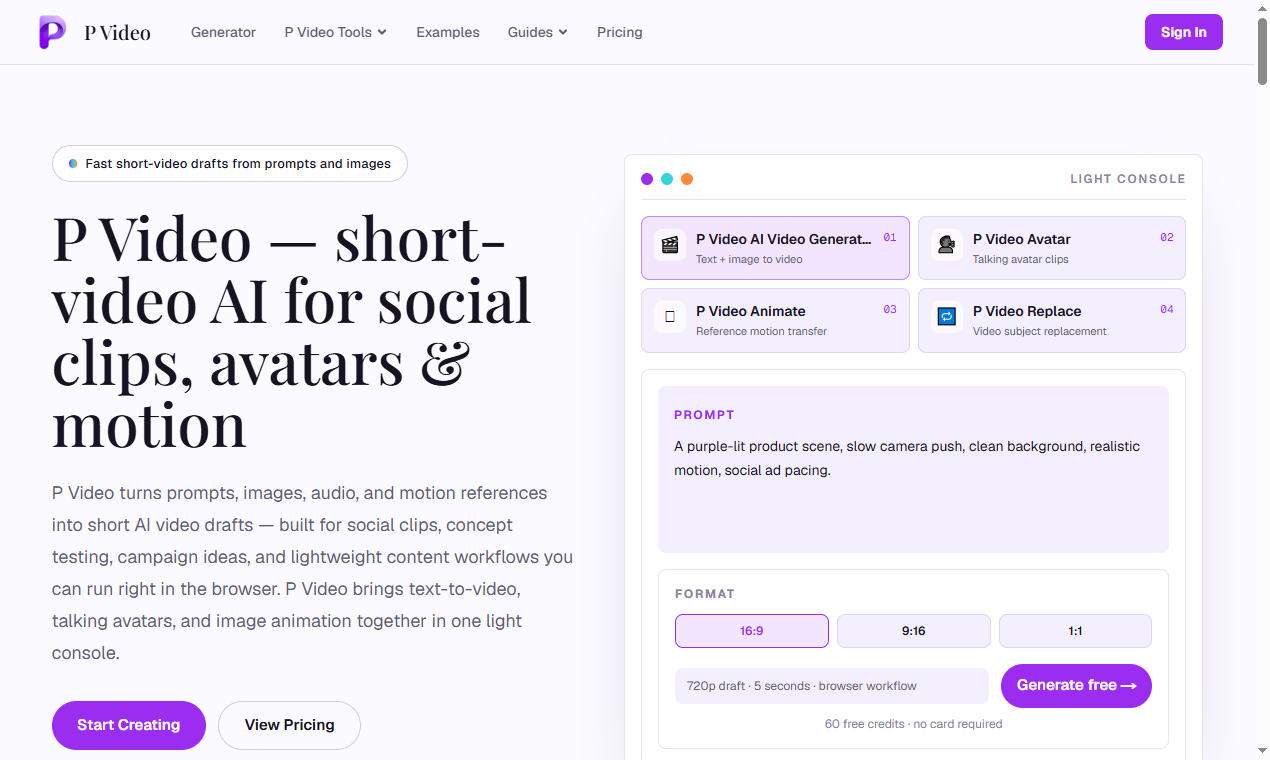
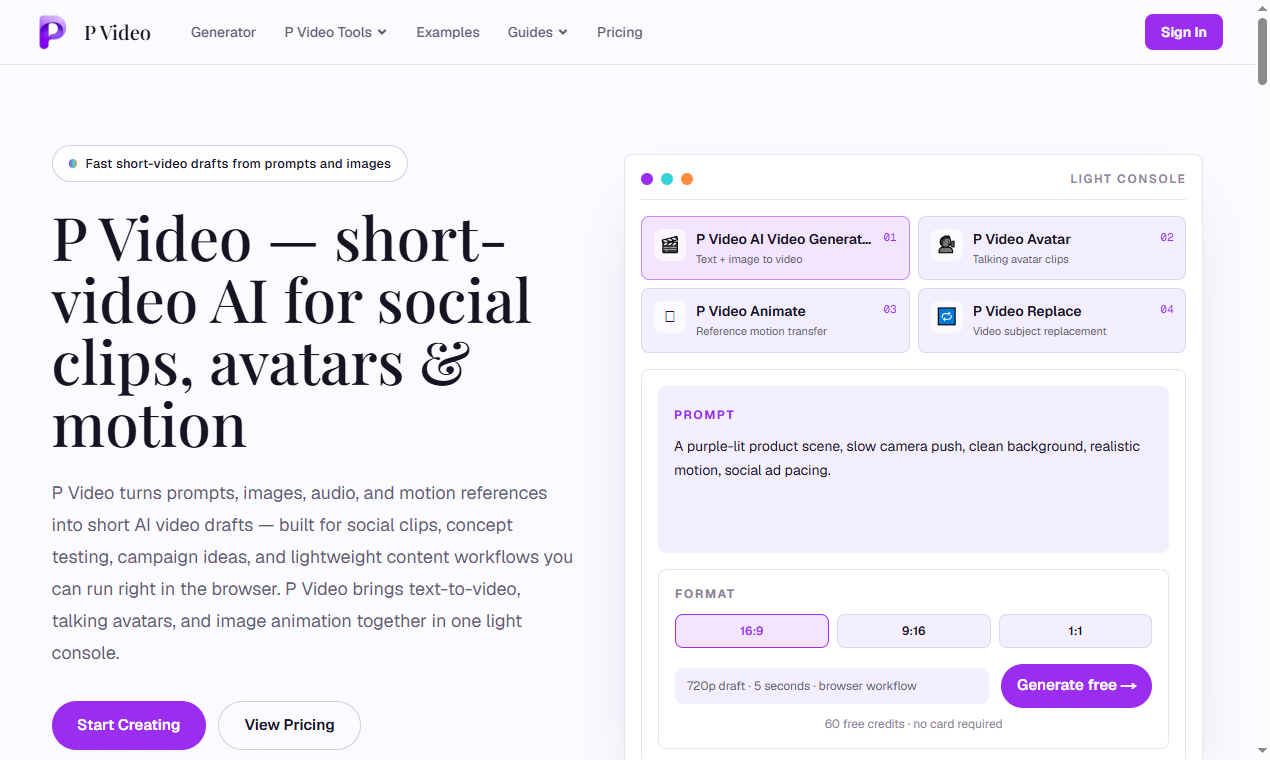

P Video is a browser-based AI video suite for short clips-text or image to video, talking avatars, image animation, and subject replacement in source footage. It targets social drafts, concept tests, and pre-production iterations rather than long-form editing timelines. New accounts get 60 free signup credits with no card required; billing is per second of output across workflows, with one-time credit packs and no subscription. Confirm per-second rates and commercial terms on pvideo.app/pricing before paid campaigns.
Social-ready clips in vertical, square, and widescreen for feeds, stories, and reels. Concept and pitch videos to share motion direction in decks or review calls faster than static boards. Motion and format tests comparing camera moves and aspect ratios before a full edit.
Avatar drafts for announcements, explainers, and internal updates from image + audio. Replace for product swaps, campaign variations, and controlled motion experiments on existing footage.
60 free signup credits; credits never expire; one-time packs only. Starter: $9.90 for 1,000 credits (~$0.0099/credit), roughly 200 seconds of 720p Generator output estimated.
Creator (620 seconds 720p Generator, most popular for social drafts), Pro (1,100 seconds, more Avatar/Animate/Replace room), Business (~2,400 seconds, lowest per-credit price). Billing is by the second per workflow (Generator, Avatar, Animate, Replace each have listed per-second rates on pricing). Example framing on site: 5-second 720p clips across workflows for cost comparison.
Light console rhythm shared across tools: prompt/upload → settings → generate → preview → download. No local install or GPU for the online workflow.
Guides include How to Use the Generator, How to Use P Video Animate, and How to Write Better Prompts, plus examples gallery. Sign in to retain library and credit balance.
MultimediaApplication-style web product at pvideo.app. Inputs: prompts, images, audio, portraits, motion references, source video, replacement images. Outputs: short downloadable clips. Per-second metering differs by tool and resolution; shared credit pool. No third-party integrations documented on fetched pages.
Pros
Cons
An online AI video generator for short clips via Generator, Avatar, Animate, and Replace workflows.
Yes-60 free signup credits, no card required for initial drafts per marketing copy.
Per second of generated output from a shared credit balance; 1080p is 2× the 720p rate.
No-credits never expire per pricing page.
Starter from $9.90 (1,000 credits); larger Creator, Pro, and Business packs on the pricing page.
Yes-the same credits work across Generator, Avatar, Animate, and Replace.
Creators and marketers who need fast short-video drafts for social, pitches, and motion tests before full production.
P Video at pvideo.app bundles text/image video, avatars, animation, and replacement into one credit-based short-form workflow. It fits teams that will prototype at 720p per second, promote winners to 1080p, and buy one-time packs instead of monthly seats.
Giang Taira

The One Startup : Navigate. Build. Grow.
Build Trust with DR Checker
Discover the Best AI Tools & SaaS Solutions

Get your brand featured here
Discover similar products in the same category

Best-TempMail.com delivers secure, reliable temporary inboxes with SPF, DMARC, TLS, QR access, and p

You can use our tool to look up trade data and bill of lading information for countries around the w

## Introduction MogScore AI is a browser-based tool that scores facial photos for camera-readiness and provides guidance on improving future shots. Available at [mogscore.ai](https://mogscore.ai), the platform runs an instant AI face-score analysis locally in the browser, returning a 0-100 score across five dimensions - Face Structure, Eyes & Expression, Nose & Mouth, Camera Setup, and Photo Quality - without requiring a login for the free preview. Users can then optionally unlock a full facial metrics report for detailed reasoning, priority-ranked fixes, and a next-photo protocol. The site is clear that scores are entertainment and self-improvement guidance, not medical or identity claims, which is an important framing for anyone evaluating the tool. ## Key Features - **Instant Browser-Local Scoring** - upload a solo selfie and receive an AI face score with five dimension bars (0-100) without any login or server-side processing for the free preview - **Five Dimension Breakdown** - scores for Face Structure, Eyes & Expression, Nose & Mouth, Camera Setup, and Photo Quality, shown as metric cards at a glance - **Free Preview Console** - see your overall score, visible dimension cards, camera and hair framing tips, and a next-photo checklist without creating an account - **Full Facial Metrics Report** - a one-time $4.99 unlock adds AI-reviewed score reasoning, visual evidence from your photo, priority-ranked fixes, camera-limited confidence notes, and a retake protocol - **No Subscription** - each full report is a one-time purchase per photo; there is no recurring billing ## Use Cases People preparing headshots, dating-profile photos, or social-media portraits can use the free preview to quickly gauge how a photo scores across key dimensions. The camera setup and photo quality scores, in particular, help identify whether the issue is lighting and framing rather than facial features - which is actionable advice for retaking the shot. Users who want structured, prioritized feedback on what to change before their next photo session can unlock the full report for specific fix order, reasoning behind each dimension score, and a retake protocol. This is aimed at self-improvement rather than diagnostic use, which the site makes explicit. ## Pricing The free preview requires no login and no payment. The Full Facial Metrics Report costs $4.99 as a one-time unlock per report - there is no subscription. Payment confirmation is required before the full report is generated, and the site emphasizes that users can review the free preview first before deciding to pay. ## User Experience and Support The workflow is streamlined into three steps: upload a clear solo selfie, let the browser-local analysis run, and review the free preview or unlock the full report. Google sign-in is only required when purchasing the full report. The site includes an FAQ section that addresses what the score is for, whether it requires login, whether it is a subscription, and how the scoring works. A "Guides" section appears in the navigation, suggesting additional resources, though the specific content was not fetched. No dedicated help center, live chat, or support email is visible on the public page. ## Technical Details MogScore runs its instant scoring entirely in the browser - the site describes this as "browser-local analysis" where camera, framing, and face signals are read locally before any paid step. The paid full report generation uses a structured score summary after the unlock payment. No server-side processing occurs for the free preview, which means the photo data for the free tier does not leave the user's device. The site does not disclose which AI model or framework powers the scoring, what training data was used, or whether any photo data is stored after the full report is generated. No API, developer tools, or integrations are mentioned. ## Pros and Cons **Pros** - Free preview with no login required, lowering the barrier to try the tool - Browser-local scoring for the free tier means photo data stays on the user's device initially - Clear dimension breakdown (five categories) makes scores interpretable - Transparent pricing - $4.99 one-time per report, no subscription - The site explicitly frames scores as entertainment and self-improvement guidance, not medical or identity claims **Cons** - The free preview locks the most actionable content - score reasoning, priority fixes, and the retake protocol - behind the paid report - The underlying AI model, training methodology, and scoring criteria are not disclosed, making it hard to assess score reliability - No visible support channel beyond the FAQ section - The site does not clarify whether photo data is retained or deleted after purchasing a full report - The scoring concept itself - rating facial appearance numerically - may not appeal to all users regardless of the entertainment framing ## FAQ ### What is MogScore AI and what does it measure? MogScore AI is a browser-based tool that scores facial photos for camera-readiness across five dimensions: Face Structure, Eyes & Expression, Nose & Mouth, Camera Setup, and Photo Quality. The site describes it as a "score preview for camera-readiness and next-photo guidance," and explicitly states that scores are entertainment framing plus self-improvement guidance, not medical or identity claims. ### Do I need to create an account to use MogScore? No. The free preview - which includes the overall score, dimension bars, camera and hair framing tips, and a next-photo checklist - does not require any login. Google sign-in is only needed when unlocking the paid Full Facial Metrics Report. ### What does the $4.99 full report include? The Full Facial Metrics Report adds AI-reviewed score reasoning, visual evidence from your photo, priority-ranked fixes with exact order, camera-limited confidence notes, and a next-photo retake protocol. It is a one-time purchase per report with no subscription. ### Is my photo data sent to a server? For the free preview, scoring runs entirely in your browser - the site states that camera, framing, and face signals are read locally. The paid report generation uses a structured score summary after unlock, but the site does not specify whether photo data is stored, transmitted, or deleted after the report is generated. Users concerned about privacy should verify the data handling policy before purchasing. ### Can I use MogScore for multiple photos? Yes. Each full report is a one-time $4.99 unlock per photo. You can run the free preview on as many photos as you want, and pay only when you want the detailed metrics report for a specific photo. ### How reliable are the scores? The site does not disclose the AI model, training data, or scoring methodology behind the scores. The scores are presented as entertainment and self-improvement guidance rather than objective measurements. Users should treat the numbers as directional feedback rather than definitive assessments. ## Conclusion MogScore AI offers a fast, no-login way to get an AI face score with a five-dimension breakdown, and the browser-local processing for the free preview is a thoughtful privacy choice. The $4.99 full report adds structured reasoning and prioritized fixes for users who want actionable retake guidance. The main caveats are the undisclosed AI methodology - which makes it hard to evaluate score reliability - the lack of clarity on data retention for paid reports, and the fact that the most useful advice is locked behind the paywall. For someone curious about how their photo scores and willing to pay for specific improvement tips, [MogScore AI](https://mogscore.ai) is a straightforward tool - but treat the scores as guidance, not measurement.