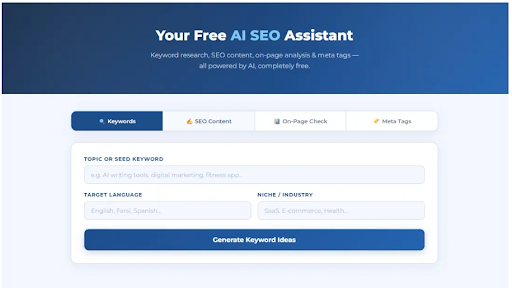
Kholaseo is a free AI-powered SEO tool built by Kholaseh Agency, a digital marketing and branding firm based in Iran. The tool functions as an AI SEO assistant that helps users with keyword research, SEO content generation, on-page analysis, and meta tag creation. Available at kholase.com/kholaseo, the platform is offered entirely free of charge as part of the agency's broader service ecosystem. Because much of the site content is in Persian, the tool appears primarily targeted at Persian-speaking markets, though the AI features likely support English SEO tasks as well. The limited public information means prospective users should evaluate the tool directly to confirm its capabilities.
Persian-speaking business owners and content creators who need basic SEO tools without paying for enterprise-level platforms can use Kholaseo for keyword research, content optimization, and meta tag generation. The free pricing makes it accessible for small businesses in Iran and other Persian-speaking regions.
SEO beginners who want to experiment with AI-assisted keyword research and content generation without committing to a paid subscription can try Kholaseo as a starting point. The tool covers fundamental SEO tasks that would otherwise require separate tools or manual work.
Agencies that already work with Kholaseh Agency for branding and digital marketing services may find the free SEO tool complements their service engagement by providing self-service keyword and content support.
Kholaseo is free to use. The site states the tool is "completely free" and does not display any paid tiers, credit systems, or premium features. The parent agency (Kholaseh Agency) offers paid services for branding, SEO, and digital growth, but the Kholaseo tool itself appears to be a free offering with no monetization visible on the product page.
The site presents a simple interface centered on the core SEO tasks: keyword research, content generation, on-page checks, and meta tag creation. Because the site is primarily in Persian, non-Persian-speaking users may find navigation challenging despite the English headings. The parent agency offers a free analysis request and contact options for broader marketing services. Specific documentation, help center, or support channels for the Kholaseo tool are not visible on the product page. Users needing help may need to contact the agency directly.
Kholaseo runs as a web-based tool. The site describes it as an "intelligent SEO tool" powered by AI, but does not disclose the specific AI models, infrastructure, or data sources used for keyword research and content generation. No API access, CMS integrations, browser extensions, or developer tools are mentioned. The tool appears to be a standalone web utility rather than a platform with external integration capabilities. Given the limited public technical documentation, users should test the tool to evaluate output quality and accuracy for their specific SEO needs.
Pros
Cons
Kholaseo is a free AI-powered SEO tool built by Kholaseh Agency. It provides keyword research, SEO content generation, on-page analysis, and meta tag creation. It appears primarily targeted at Persian-speaking businesses and content creators, though it likely supports English SEO tasks as well.
Yes. The site states the tool is "completely free" with no visible paid tier, credit system, or premium features on the product page.
Based on the public site, Kholaseo covers four core functions: keyword research, SEO content generation, on-page SEO analysis, and meta tag creation. The depth and quality of each function should be tested directly, as the site provides limited detail.
The tool's English-language heading ("Meet Kholaseo Your AI SEO Assistant") and feature descriptions suggest English-language support, but the primary site content is in Persian. English-speaking users should verify output quality and language capabilities before relying on it for production SEO work.
Specific documentation, a help center, or dedicated support channels are not visible on the product page. Users may need to contact Kholaseh Agency directly through the parent site for assistance.
Test the quality of keyword suggestions, content output, on-page analysis accuracy, and meta tag generation for your target language and market. Also confirm whether the tool stores your data or inputs, as no privacy policy details are visible on the product page.
Kholaseo offers a free, straightforward set of AI SEO tools for keyword research, content generation, on-page checks, and meta tags. The zero-cost model and agency backing give it credibility as an entry-level option, particularly for Persian-speaking businesses. However, the low evidence coverage - sparse documentation, undisclosed AI models, limited English-language content, and no visible support channels - means users should evaluate the tool's output quality carefully before relying on it for production SEO work. For businesses that need basic SEO assistance and are comfortable with the language context, Kholaseo is worth testing - but it should be validated against other tools before becoming part of a serious SEO workflow.

Kholaseh Agency
Build Trust with DR Checker

Discover the Best AI Tools & SaaS Solutions
The One Startup : Navigate. Build. Grow.
Get your brand featured here
Discover similar products in the same category
Turn your ideas into cinematic masterpieces through our advanced Seedance
Plan the shot first, then generate: duration, aspect ratio and model as separate controls

Type your name and see it in real cursive fonts, ready to download as PNG or SVG.