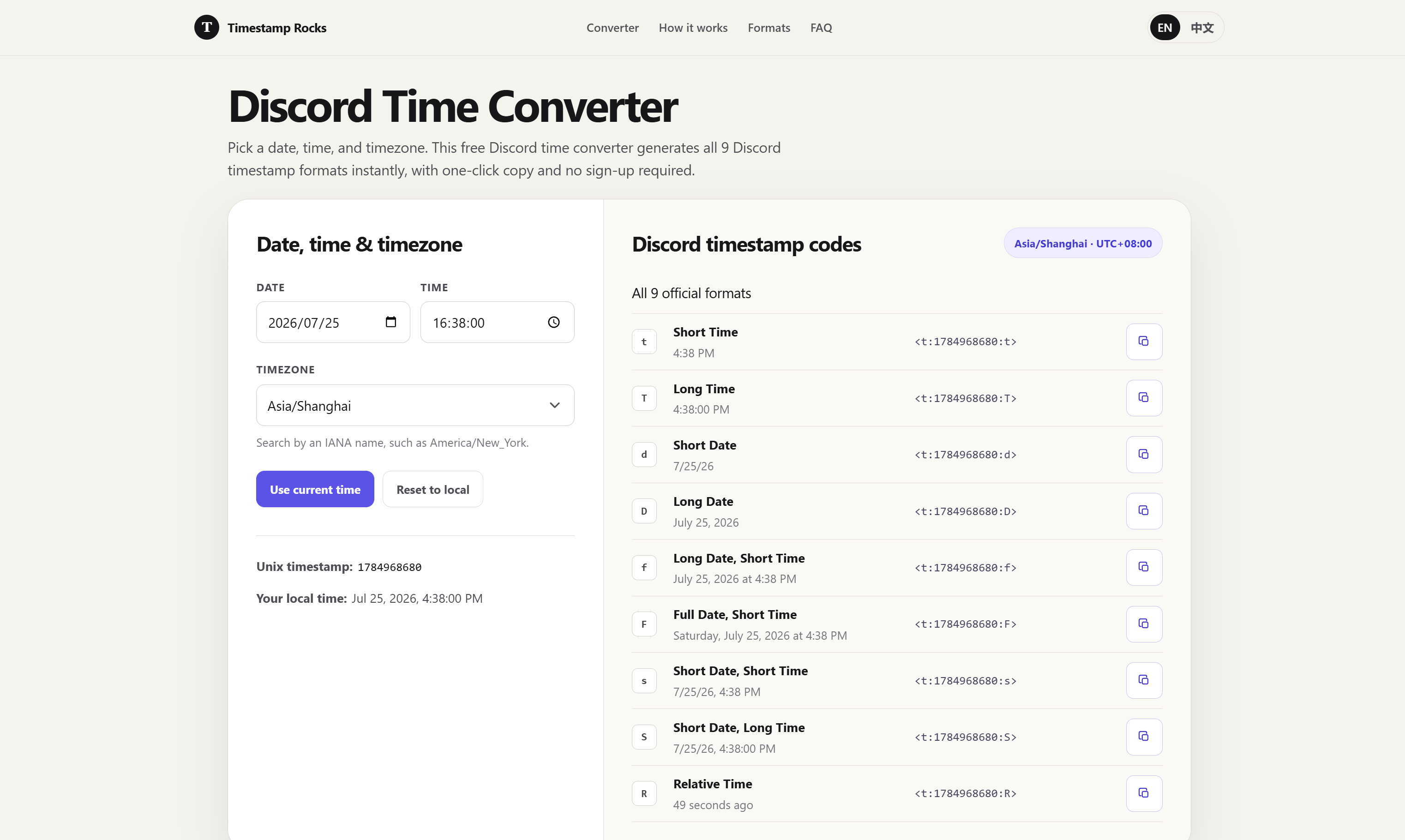

Timestamp Rocks is a free, browser-based Discord timestamp converter that transforms any date and time into Discord's timestamp markup format. The tool generates all 9 Discord timestamp styles from a single input, handles timezone selection with IANA zone support, and validates daylight-saving edge cases automatically. For Discord server admins, event organizers, and community managers who need to schedule announcements or pin time-sensitive messages that display correctly in every viewer's local timezone, this tool removes the manual math of converting dates to Unix timestamps.
For Discord server admins who regularly schedule events, game nights, or community meetups, the tool eliminates the need to manually calculate Unix timestamps or look up timezone offsets. Enter the event time once, select the timezone, and copy the formatted code - all viewers see the event in their local time automatically.
For content creators and community managers who pin time-sensitive announcements, the timestamp converter ensures that deadlines, launch times, and scheduled drops display correctly across international audiences. The daylight-saving validation prevents the edge case where a pinned announcement shows the wrong hour for some participants.
For developers and bot operators who work with Discord's API, the existing timestamp loader provides a quick way to decode and verify timestamps without writing conversion scripts. The IANA timezone support aligns with standard programmatic timezone handling.
Timestamp Rocks is completely free. The site states no sign-up is required, and all features - including all 9 timestamp formats, timezone selection, and daylight-saving validation - are available without payment or account creation.
The interface is focused: a date/time picker, timezone selector, and generated codes output. The three-step workflow (choose time, confirm timezone, copy code) is clearly documented on the page. A blog and FAQ section are linked in the navigation, though their depth is not visible in the fetched evidence. The tool supports English and Chinese language options.
The tool uses IANA timezone databases for accurate timezone resolution and daylight-saving rule application. It validates wall-clock times against timezone transition rules to catch skipped or repeated times. The generated Discord timestamp syntax uses Unix seconds (not milliseconds), and the site includes guidance on dividing JavaScript millisecond values by 1,000 before insertion. The tool is entirely browser-based with no server-side processing mentioned.
Pros
Cons
Timestamp Rocks is a free, browser-based tool that converts any date and time into Discord timestamp markup. It supports all 9 Discord timestamp formats, handles timezone selection with IANA zones, and validates daylight-saving edge cases.
No. The tool is fully functional without sign-up. All features, including all 9 timestamp formats and timezone selection, are available immediately.
The tool checks whether the selected date and time fall during a daylight-saving transition. If a wall-clock time is skipped or repeated due to DST changes, the tool flags it so you can choose a valid time instead.
The tool uses IANA timezone names, which cover all standard timezones worldwide. You can search by city or zone name, such as America/New_York or Europe/Berlin. Quick-set buttons are also available for common offsets.
Yes. Paste a Discord timestamp code or Unix seconds value into the loader to decode and view it. This is useful for verifying timestamps shared by others or understanding the format.
Discord supports 9 timestamp formatting styles ranging from short date-only to full date-and-time with seconds. The tool generates all variants from a single input so you can pick the style that fits your message.
Timestamp Rocks solves a specific, recurring problem for Discord community managers: generating timestamps that display correctly in every viewer's local timezone. The IANA timezone support and daylight-saving validation address the edge cases that cause the most confusion. The free, no-signup approach makes it practical for quick use, and the one-click copy keeps the workflow fast. For anyone who regularly schedules Discord events or pins time-sensitive announcements, the tool is worth bookmarking - though its narrow scope means it serves that one purpose well rather than offering broader time management features.
郑谷歌

Discover the Best AI Tools & SaaS Solutions
Build Trust with DR Checker
The One Startup : Navigate. Build. Grow.

Get your brand featured here
Discover similar products in the same category

## Introduction BizHire is an AI-powered recruitment platform built by BizWorkHQ that automates the hiring process from job description creation through candidate screening, scoring, and interview scheduling. The platform targets startups, small businesses, remote companies, and staffing agencies that want to reduce the manual overhead of reviewing resumes, coordinating interviews, and tracking applicants. BizHire is part of the broader BizWork suite, which also covers IT service management, CRM, HRMS, and accounts - but BizHire focuses specifically on the recruitment pipeline. The site emphasizes speed and bias reduction, claiming the AI can cut repetitive hiring tasks and help teams make data-backed decisions faster. ## Key Features - **AI Job Description Generation** - creates role-specific, bias-free job descriptions in seconds, optimized for search visibility and candidate appeal - **AI Resume Parsing** - uploads and extracts skills, experience, and education from multiple resumes instantly, eliminating manual data entry - **AI Candidate Scoring** - ranks applicants based on job fit and defined criteria, using AI to evaluate skills, experience, and cultural fit - **Smart Screening** - automatically matches candidate profiles to role requirements, reducing hours of manual resume review - **AI Interviewer** - conducts initial interviews via AI chat or video for structured, consistent candidate screening - **Candidate Relationship Management** - tracks applicant history, notes, and activity to maintain engagement and build a talent pipeline - **Custom Scorecards** - allows teams to define their own evaluation formats (stars, numeric, etc.) for different roles and agencies - **Candidate Talent Pool** - reuses pre-screened candidates from previous hiring cycles so teams do not start from scratch for each new role - **Multi-Platform Job Posting** - posts jobs across multiple platforms with one click, including LinkedIn, Facebook, Twitter, Indeed, Glassdoor, and ZipRecruiter - **Reporting & Analytics** - provides hiring dashboards, time-to-hire and cost-per-hire reports, recruiter performance metrics, and source/channel performance scoring ## Use Cases Startups with limited hiring bandwidth can use BizHire to automate resume screening and candidate shortlisting, freeing the founding team to focus on growth rather than paperwork. The AI-generated job descriptions and smart screening reduce the time spent on repetitive early-stage tasks. Small businesses that receive high volumes of applications but lack a dedicated HR team can rely on the AI scoring and automated interview scheduling to move candidates through the pipeline without manual coordination. The platform's custom scorecards help maintain consistency across different roles. Staffing agencies managing multiple clients and open positions simultaneously can use the candidate talent pool and multi-platform job posting features to source and screen candidates at scale. The ability to reuse pre-screened candidates across roles is particularly relevant for agencies that fill similar positions repeatedly. Remote companies hiring across time zones benefit from the AI interviewer and automated scheduling, which handle initial screening without requiring synchronous availability from recruiters and candidates. ## Pricing BizHire offers a 7-day free trial for new users. The site mentions flexible plans based on hiring needs, suitable for startups through enterprises, but does not list specific prices on the public pages. Users are directed to contact the team at notifications@bizworkhq.com for a custom quote or to visit the pricing page for details. The lack of public pricing means teams will need to engage with sales to evaluate cost fit. ## User Experience and Support The platform follows a structured hiring workflow: AI generates job descriptions, resumes are parsed and scored, candidates are screened automatically, and interviews are scheduled with calendar integration. BizHire integrates with Google Meet, Zoom, Slack, Google Calendar, and Outlook, which covers most common communication and scheduling tools. The site features a "Request a Demo" option, a blog with posts on hiring topics, and case studies. Support contacts include an email address (notifications@bizworkhq.com). The platform also offers role-based access control so different team members can collaborate securely within the hiring workflow. ## Technical Details BizHire runs as a cloud-based platform and integrates with popular ATS systems, HR tools, and CRM platforms. The specific AI architecture is not disclosed, but the platform uses AI for resume parsing, candidate scoring, interview automation, and feedback analysis. Job distribution spans LinkedIn, Facebook, Twitter, Indeed, Glassdoor, and ZipRecruiter. The broader BizWork suite includes ITSM, CRM, HRMS, and accounts modules, suggesting BizHire can operate as part of a larger workforce management system. The site mentions GDPR and EEOC compliance, though the specifics of their compliance certifications are not detailed on the public pages. ## Pros and Cons **Pros** - Covers the full recruitment pipeline from job description to onboarding in one platform - AI-driven screening and scoring can significantly reduce manual review time - Multi-platform job posting with one click broadens candidate reach - Integrations with Zoom, Slack, Google Calendar, and Outlook fit common team workflows - Candidate talent pool feature helps avoid restarting the hiring cycle for similar roles - Part of a broader office management suite for teams that need HR, ITSM, and CRM together **Cons** - No public pricing, so evaluating cost requires a sales conversation - Specific AI architecture and model details are not disclosed - Compliance claims (GDPR, EEOC) are mentioned but not substantiated with audit details - The breadth of features across the BizWork suite may be more than teams looking only for recruitment need - The site's "50% cost savings" and "40% task reduction" claims are not independently verified ## FAQ ### What is BizHire and what does it do? BizHire is an AI-powered recruitment platform by BizWorkHQ that automates the hiring process - from generating job descriptions and parsing resumes to scoring candidates and scheduling interviews. It is designed for startups, small businesses, remote companies, and staffing agencies. ### Can BizHire integrate with my existing ATS? The site states that BizHire integrates with most ATS and HR systems. Specific integrations mentioned include Google Meet, Zoom, Slack, Google Calendar, and Outlook. Teams with less common ATS setups should verify compatibility before committing. ### Is BizHire suitable for small businesses? Yes. The platform is built to scale and specifically addresses small business use cases on its site, including automated screening and shortlisting for teams with limited HR capacity. ### How does the AI candidate scoring work? BizHire's AI scores candidates based on qualifications, skills, and cultural fit according to criteria defined for each role. Custom scorecards allow teams to adjust the evaluation format. The site does not disclose the underlying AI model or scoring methodology. ### What does BizHire cost? BizHire offers a 7-day free trial. Beyond that, pricing is not publicly listed. The site encourages users to contact the team at notifications@bizworkhq.com for a custom quote based on their hiring needs. ### Does BizHire handle interview scheduling? Yes. The platform automates interview bookings and syncs with calendars (Google Calendar, Outlook) to eliminate back-and-forth scheduling. It also offers an AI Interviewer feature that conducts initial screening interviews via chat or video. ### Is BizHire's hiring process compliant with fair hiring laws? The site mentions compliance with GDPR and EEOC and states that the AI is designed to reduce bias in screening and scoring. Organizations with specific compliance requirements should request documentation from the BizHire team to verify the details. ## Conclusion BizHire offers a feature-rich AI recruitment platform that covers the full hiring lifecycle from job posting to onboarding, with particularly strong automation around resume parsing, candidate scoring, and interview scheduling. The integrations with common tools like Zoom, Slack, and major job boards make it practical for teams already using those platforms. The main considerations are the absence of public pricing, the undisclosed AI methodology, and compliance claims that would need verification for regulated industries. For startups and small businesses looking to automate repetitive hiring tasks, BizHire's [7-day free trial](https://www.bizworkhq.com/ai-recruitment-software) is a reasonable starting point.

You can use our tool to look up trade data and bill of lading information for countries around the w