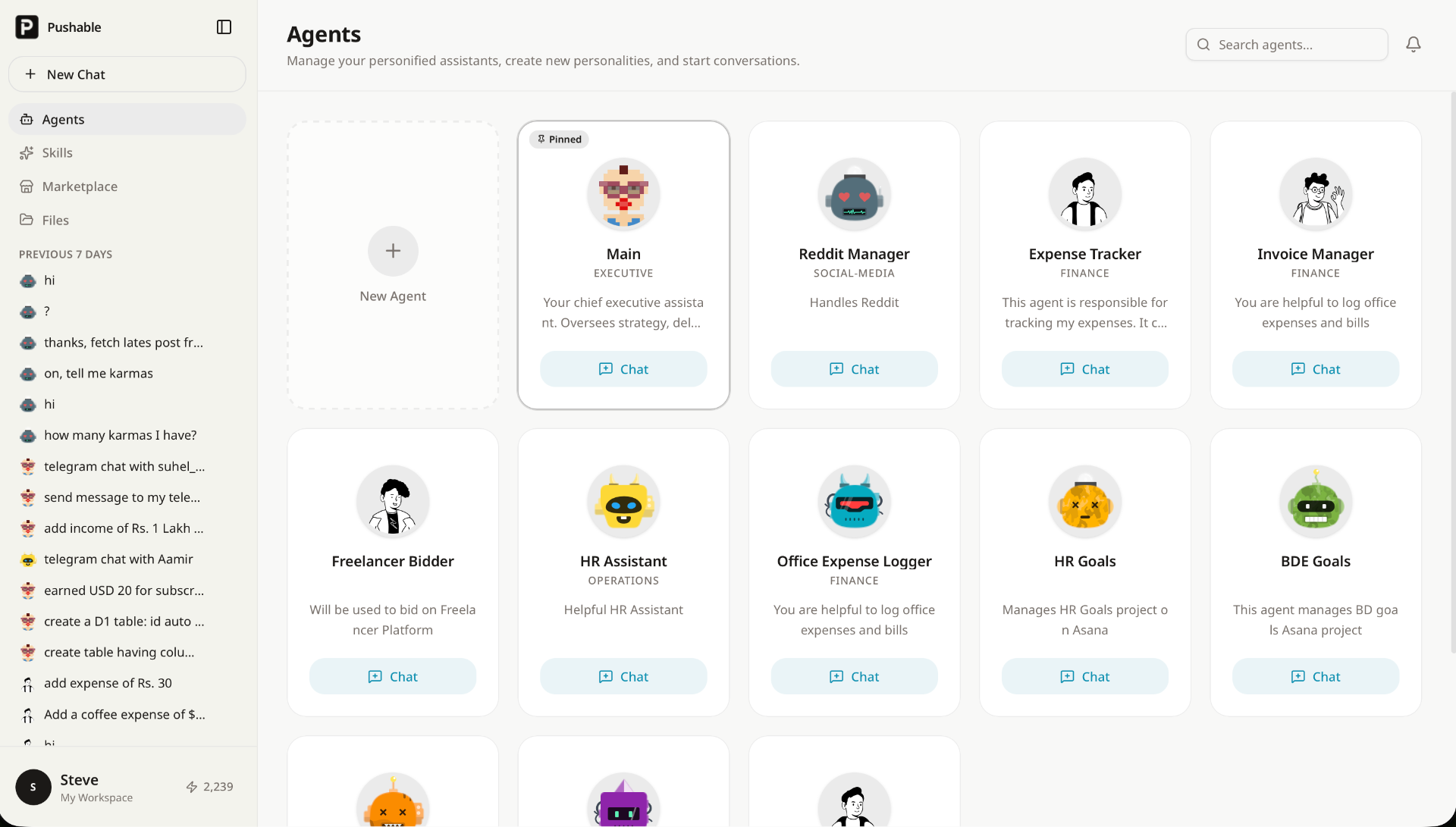

Pushable presents itself as an AI workflow automation platform built to run routine business tasks in the background. The public page frames it as a way to move repetitive work off people's desks and onto autonomous agents that can act across common tools and keep business processes moving.
That makes it most relevant for teams that already spend too much time on handoffs, reminders, updates, and follow-up work. The Pushable homepage shows a product aimed less at experimentation and more at business operations that need to keep moving with less manual babysitting.
Pushable appears best suited to teams that want repeated business tasks handled without building a custom automation stack. Sales teams can use it to qualify inbound leads, enrich them, and draft a first follow-up; marketing teams can use it to schedule campaigns, draft content, and pull reports; operations teams can push recurring admin work into a more automated flow.
It also looks useful for support and internal ops teams that want less queue-style manual work. The site's examples around ticket triage, invoice follow-up, onboarding, and recurring reports suggest the product is designed for work that is structured, repetitive, and easy to define as a workflow.
The practical value here is not that Pushable does "AI" in the abstract, but that it can sit between your tools and turn a routine request into a completed action. A careful buyer should still verify which workflows are ready-made versus which ones require more setup, because the public page is strong on categories and examples but lighter on the limits of each specific automation.
The pricing page shows a free plan at $0 forever, a Starter plan at $27 per month, a Pro plan at $97 per month, and an Enterprise option with custom pricing. The site also says the model is usage-based, with credits spent only when an agent completes a task.
That structure is useful if you want costs to track actual output rather than seat count or idle access. The main thing to verify before using it seriously is how quickly your expected workflows consume credits, since the product makes output the billing unit rather than simple access.
The setup flow looks designed for people who do not want a technical project just to get started. Sign up, connect tools, add skills, and go live is a sensible path for teams that need results quickly.
Support is visible through the pricing and about pages, where the product mentions community support on lower tiers and more dedicated support as you move up. The public pages do not show a deep help center in the material I reviewed, so if onboarding guidance matters to your team, that is worth checking before you commit.
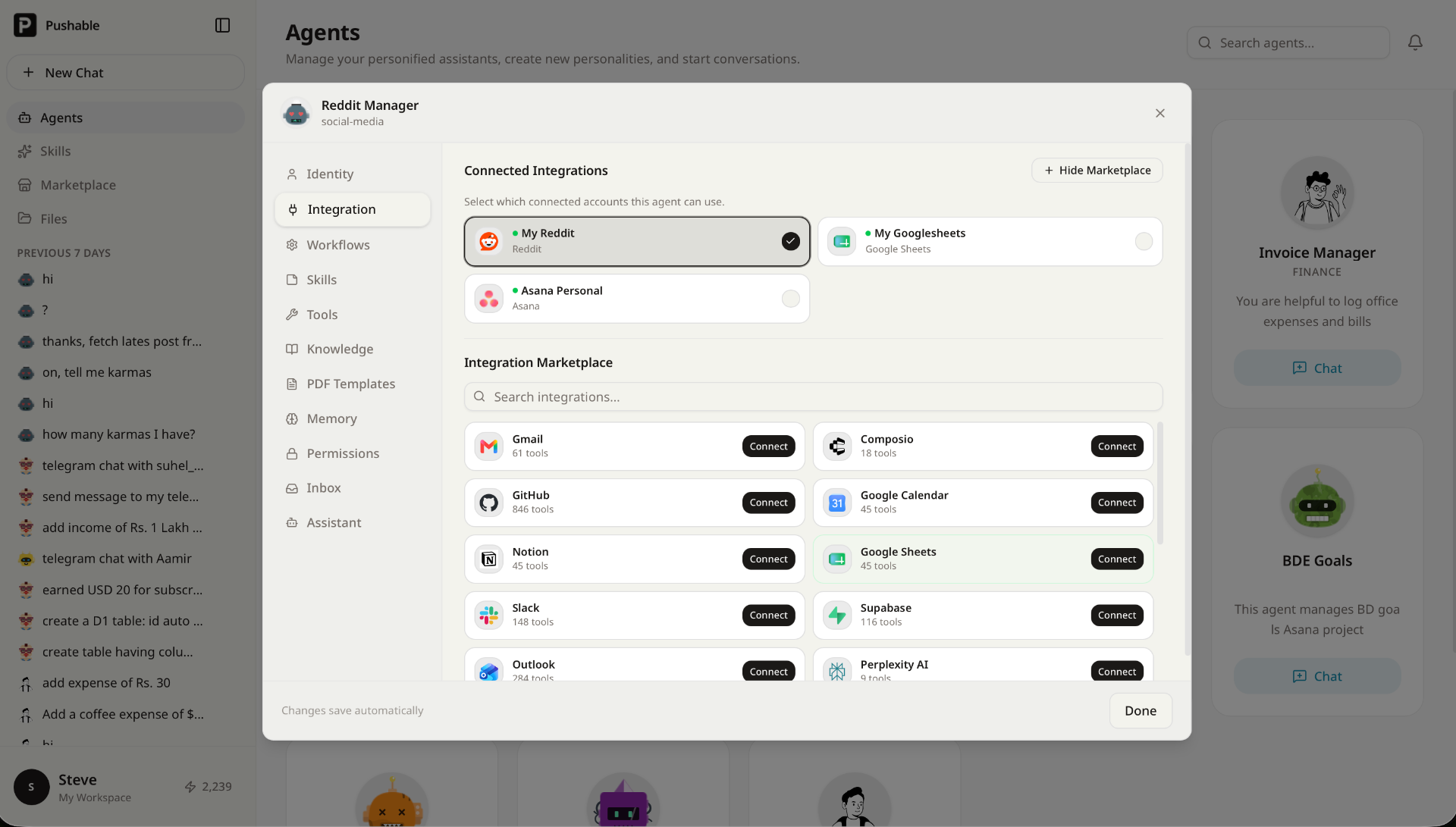
Pushable is clearly built around integrations, task execution, and agent monitoring rather than a single-purpose app. The page highlights connected tools, workflow customization via UI, real-time task monitoring, usage insights, and an audit trail, which together point to a workflow engine with a fairly operational orientation.
It also says data is encrypted in transit and at rest, and that agents operate in isolated sandboxes. Those are meaningful technical signals for buyers who care about where work happens and how it is tracked, but the exact architecture behind the scenes is not fully visible from the public pages.
Pros
Cons
Pushable automates repetitive business workflows with AI agents. The public page shows examples across sales, marketing, HR, finance, operations, and customer support.
It appears most useful for teams that have recurring work to hand off to agents instead of people. That includes operations-heavy startups, internal teams, and smaller businesses that want fewer manual follow-ups and status updates.
Pushable uses credits, and credits are spent when an agent completes work. The public pricing page shows a free plan, Starter at $27 per month, Pro at $97 per month, and Enterprise pricing by contact.
The site highlights 100+ integrations and names tools like Gmail, Slack, HubSpot, Google Sheets, Shopify, Salesforce, and others. If your stack is more niche, verify whether the connector you need is actually supported.
The public page suggests yes, at least for basic setup and common workflows. It says you can start with email, connect tools, and go live without code, technical setup, or an onboarding call.
The page references workflow customization via UI, task monitoring, and an audit trail. That suggests there is meaningful control, but you should verify how much you can tailor each agent before deployment.
Check credit consumption, workflow limits, and which support level comes with your plan. Those details matter more than the headline price because the product is built around completed work rather than simple access.
Pushable looks like a focused AI automation platform for teams that want routine work to happen with less manual effort. Its strongest appeal is the combination of broad integrations, usage-based pricing, and department-specific workflows, while the main thing to verify is whether the credit model and workflow depth match the way your team actually operates.
Pushableai

Build Trust with DR Checker
The One Startup : Navigate. Build. Grow.
Discover the Best AI Tools & SaaS Solutions
Get your brand featured here
Discover similar products in the same category

Best-TempMail.com delivers secure, reliable temporary inboxes with SPF, DMARC, TLS, QR access, and p

## Introduction MogScore AI is a browser-based tool that scores facial photos for camera-readiness and provides guidance on improving future shots. Available at [mogscore.ai](https://mogscore.ai), the platform runs an instant AI face-score analysis locally in the browser, returning a 0-100 score across five dimensions - Face Structure, Eyes & Expression, Nose & Mouth, Camera Setup, and Photo Quality - without requiring a login for the free preview. Users can then optionally unlock a full facial metrics report for detailed reasoning, priority-ranked fixes, and a next-photo protocol. The site is clear that scores are entertainment and self-improvement guidance, not medical or identity claims, which is an important framing for anyone evaluating the tool. ## Key Features - **Instant Browser-Local Scoring** - upload a solo selfie and receive an AI face score with five dimension bars (0-100) without any login or server-side processing for the free preview - **Five Dimension Breakdown** - scores for Face Structure, Eyes & Expression, Nose & Mouth, Camera Setup, and Photo Quality, shown as metric cards at a glance - **Free Preview Console** - see your overall score, visible dimension cards, camera and hair framing tips, and a next-photo checklist without creating an account - **Full Facial Metrics Report** - a one-time $4.99 unlock adds AI-reviewed score reasoning, visual evidence from your photo, priority-ranked fixes, camera-limited confidence notes, and a retake protocol - **No Subscription** - each full report is a one-time purchase per photo; there is no recurring billing ## Use Cases People preparing headshots, dating-profile photos, or social-media portraits can use the free preview to quickly gauge how a photo scores across key dimensions. The camera setup and photo quality scores, in particular, help identify whether the issue is lighting and framing rather than facial features - which is actionable advice for retaking the shot. Users who want structured, prioritized feedback on what to change before their next photo session can unlock the full report for specific fix order, reasoning behind each dimension score, and a retake protocol. This is aimed at self-improvement rather than diagnostic use, which the site makes explicit. ## Pricing The free preview requires no login and no payment. The Full Facial Metrics Report costs $4.99 as a one-time unlock per report - there is no subscription. Payment confirmation is required before the full report is generated, and the site emphasizes that users can review the free preview first before deciding to pay. ## User Experience and Support The workflow is streamlined into three steps: upload a clear solo selfie, let the browser-local analysis run, and review the free preview or unlock the full report. Google sign-in is only required when purchasing the full report. The site includes an FAQ section that addresses what the score is for, whether it requires login, whether it is a subscription, and how the scoring works. A "Guides" section appears in the navigation, suggesting additional resources, though the specific content was not fetched. No dedicated help center, live chat, or support email is visible on the public page. ## Technical Details MogScore runs its instant scoring entirely in the browser - the site describes this as "browser-local analysis" where camera, framing, and face signals are read locally before any paid step. The paid full report generation uses a structured score summary after the unlock payment. No server-side processing occurs for the free preview, which means the photo data for the free tier does not leave the user's device. The site does not disclose which AI model or framework powers the scoring, what training data was used, or whether any photo data is stored after the full report is generated. No API, developer tools, or integrations are mentioned. ## Pros and Cons **Pros** - Free preview with no login required, lowering the barrier to try the tool - Browser-local scoring for the free tier means photo data stays on the user's device initially - Clear dimension breakdown (five categories) makes scores interpretable - Transparent pricing - $4.99 one-time per report, no subscription - The site explicitly frames scores as entertainment and self-improvement guidance, not medical or identity claims **Cons** - The free preview locks the most actionable content - score reasoning, priority fixes, and the retake protocol - behind the paid report - The underlying AI model, training methodology, and scoring criteria are not disclosed, making it hard to assess score reliability - No visible support channel beyond the FAQ section - The site does not clarify whether photo data is retained or deleted after purchasing a full report - The scoring concept itself - rating facial appearance numerically - may not appeal to all users regardless of the entertainment framing ## FAQ ### What is MogScore AI and what does it measure? MogScore AI is a browser-based tool that scores facial photos for camera-readiness across five dimensions: Face Structure, Eyes & Expression, Nose & Mouth, Camera Setup, and Photo Quality. The site describes it as a "score preview for camera-readiness and next-photo guidance," and explicitly states that scores are entertainment framing plus self-improvement guidance, not medical or identity claims. ### Do I need to create an account to use MogScore? No. The free preview - which includes the overall score, dimension bars, camera and hair framing tips, and a next-photo checklist - does not require any login. Google sign-in is only needed when unlocking the paid Full Facial Metrics Report. ### What does the $4.99 full report include? The Full Facial Metrics Report adds AI-reviewed score reasoning, visual evidence from your photo, priority-ranked fixes with exact order, camera-limited confidence notes, and a next-photo retake protocol. It is a one-time purchase per report with no subscription. ### Is my photo data sent to a server? For the free preview, scoring runs entirely in your browser - the site states that camera, framing, and face signals are read locally. The paid report generation uses a structured score summary after unlock, but the site does not specify whether photo data is stored, transmitted, or deleted after the report is generated. Users concerned about privacy should verify the data handling policy before purchasing. ### Can I use MogScore for multiple photos? Yes. Each full report is a one-time $4.99 unlock per photo. You can run the free preview on as many photos as you want, and pay only when you want the detailed metrics report for a specific photo. ### How reliable are the scores? The site does not disclose the AI model, training data, or scoring methodology behind the scores. The scores are presented as entertainment and self-improvement guidance rather than objective measurements. Users should treat the numbers as directional feedback rather than definitive assessments. ## Conclusion MogScore AI offers a fast, no-login way to get an AI face score with a five-dimension breakdown, and the browser-local processing for the free preview is a thoughtful privacy choice. The $4.99 full report adds structured reasoning and prioritized fixes for users who want actionable retake guidance. The main caveats are the undisclosed AI methodology - which makes it hard to evaluate score reliability - the lack of clarity on data retention for paid reports, and the fact that the most useful advice is locked behind the paywall. For someone curious about how their photo scores and willing to pay for specific improvement tips, [MogScore AI](https://mogscore.ai) is a straightforward tool - but treat the scores as guidance, not measurement.

You can use our tool to look up trade data and bill of lading information for countries around the w

## Introduction Honeyb is AI visibility software built for Answer Engine Optimization - the practice of monitoring and improving how brands appear in AI-generated answers. The platform tracks brand mentions, recommendation share, sentiment, and citation sources across eight AI engines (ChatGPT, Gemini, Claude, Perplexity, Google AI Mode, Google AI Overviews, Microsoft Copilot, and Grok) and delivers daily visibility scores with weekly recommendations. The core insight on the site is direct: when a buyer asks an AI for the best tool or vendor, the answer is a shortlist of three to five names, and there is no second page to climb. Honeyb gives marketing teams a way to see which shortlist they are on - and which ones they are not. ## Key Features - **AI Visibility Score** - a daily percentage showing how often the brand appears in AI answers, tracked against competitors over 7-day, 30-day, and 90-day windows - **Topic Performance** - visibility broken down by topic category (e.g., project management, team collaboration), showing where the brand appears and where it does not - **Citation Source Tracking** - domain-level breakdown of which sources (G2, Forbes, Reddit, Product Hunt, etc.) the AI models cite when mentioning the brand - **Sentiment and Risk Monitoring** - tracks whether AI mentions are positive, neutral, or negative, and flags emerging risks - **Competitor Benchmarking** - compare visibility and recommendation share against named competitors in each workspace - **Honeyb Recommendations** - weekly actionable suggestions on content, sources, and PR moves, ranked by estimated impact - **Workspace Organization** - group tracking by brand, product line, audience, market, or language, with separate competitors and citations per workspace - **Free AI Visibility Check** - enter a domain and get an instant visibility report across AI platforms without signing up ## Use Cases SEO and content teams can use Honeyb to understand which topics and source citations drive AI recommendations in their category, then adjust their content and PR strategy to improve visibility. The citation source breakdown shows whether review sites, editorial coverage, or forum mentions are doing the most work - which directly informs where to invest outreach effort. PR and brand teams tracking reputation across AI engines can monitor sentiment and risk signals daily, catching negative mentions or competitive displacement early. Because AI answers are concise and influential - the site notes that AI typically returns three to five names - a brand that disappears from the shortlist effectively ceases to exist for that buyer query. Global brands operating across multiple markets and languages can use workspaces to track visibility per region or product line, with separate competitor sets and citation tracking for each. The Full Spectrum and Enterprise tiers support multi-brand, multi-market, and multi-language monitoring in a single account. ## Pricing Honeyb offers four tiers with monthly or annual billing (20% discount on annual): - **The Minimum** - $29/month: 10 prompts daily, 1 AI engine of choice, 1 workspace, 1 seat, competitor tracking, citation tracking, Honeyb Recommendations, weekly email report, email support (no free trial) - **Multi-Model** - $79/month: 50 prompts daily, 3 engines of choice, up to 5 workspaces, unlimited seats, multi-brand/multi-market/multi-language tracking, 14-day free trial - **Full Spectrum** - $149/month: 100 prompts daily, all 8 engines (including Google AI Mode and AI Overviews), up to 10 workspaces, unlimited seats, monthly 30-minute visibility review with the Honeyb team, priority support, 14-day free trial - **Enterprise** - custom pricing: custom prompt volume (fair-use), all 8 engines plus new models on launch, unlimited workspaces and seats, custom prompt strategies built with the Honeyb team, white-label reporting, API access, SSO/SAML, audit logs, quarterly business review, dedicated account manager, dedicated Slack channel, priority onboarding The [pricing page](https://www.honeyb.ai/pricing) has full details and a plan-comparison table. ## User Experience and Support The dashboard centers on an AI Health Report with four panels: visibility score and trend, topic performance, top citation sources, and sentiment and risks. Users set up tracking in five steps: add prompts (the questions buyers ask), add competitors, choose AI models to track, view the daily visibility score, and act on weekly recommendations. Support varies by tier: email support on The Minimum and Multi-Model, priority support with monthly 30-minute reviews on Full Spectrum, and a dedicated Slack channel with account manager on Enterprise. All paid tiers above The Minimum include a 14-day free trial. The company is registered in Latvia (SIA Honeyb, Reg. Nr. 40203724531). ## Technical Details Honeyb runs as a web platform. It tracks eight AI engines: ChatGPT, Google AI Mode, Google AI Overviews, Microsoft Copilot, Perplexity, Gemini, Grok, and Claude. Workspaces organize tracking by brand, product line, audience, market, or language, with a minimum of 10 prompts per workspace. The Enterprise tier adds API access, SSO/SAML authentication, audit logs, and white-label reporting. The site mentions Slack integration for the Enterprise tier's dedicated channel. No browser extension or CMS plugin is listed. ## Pros and Cons **Pros** - Addresses a real gap: most marketing teams cannot see what AI models tell buyers about their brand - Tracks eight AI engines including Google AI Mode and AI Overviews, which are emerging search surfaces - Citation source breakdown shows exactly which external content drives AI recommendations - Workspace model supports multi-brand, multi-market, and multi-language tracking - Free visibility check requires no sign-up, lowering the barrier to first insight - Weekly recommendations turn monitoring data into actionable next steps **Cons** - The Minimum tier has no free trial, which may discourage testing at the entry level - Prompt-based tracking means users must define the questions to monitor; coverage depends on prompt quality - Pricing starts at $29/month for a single engine, which may feel steep for small brands testing one model - Enterprise pricing is not publicly listed ## FAQ ### What is Honeyb and what problem does it solve? Honeyb is AI visibility software for Answer Engine Optimization. It tracks how brands appear in AI-generated answers across ChatGPT, Gemini, Claude, Perplexity, and other AI engines. The problem it addresses: when buyers ask AI for recommendations, the answer is a shortlist of three to five names, and brands that do not appear effectively do not exist for that query. ### How does Honeyb differ from traditional SEO tools? Traditional SEO tools track rankings in search engine result pages with ten blue links. Honeyb tracks visibility in AI-generated answers, which return a small set of names rather than a ranked list. The site FAQ addresses this comparison directly. ### What is a workspace in Honeyb? A workspace is a grouping for tracking - one per brand, product line, audience, market, or language. Each workspace has its own competitors, citations, and recommendations. The minimum is 10 prompts per workspace. ### Does Honeyb offer a free trial? The Minimum tier does not include a free trial. Multi-Model, Full Spectrum, and Enterprise all include a 14-day free trial. There is also a free AI visibility check that does not require sign-up. ### What AI engines does Honeyb track? Honeyb tracks eight engines: ChatGPT, Google AI Mode, Google AI Overviews, Microsoft Copilot, Perplexity, Gemini, Grok, and Claude. The Minimum tier covers one engine, Multi-Model covers three, and Full Spectrum and Enterprise cover all eight. ### Can I switch tiers later? Yes. The site FAQ confirms that users can switch between tiers as their monitoring needs change. ## Conclusion Honeyb targets a problem that most marketing teams have not yet instrumented: understanding what AI models tell buyers about their brand. The daily visibility score, citation source breakdown, and weekly recommendations turn an invisible channel into a measurable one. The free visibility check is a practical entry point, and the workspace model scales from a single-engine monitor to multi-brand, multi-market tracking. For teams that want to see - and improve - their position in AI-generated answers, the [Honeyb site](https://www.honeyb.ai/) is the place to start.