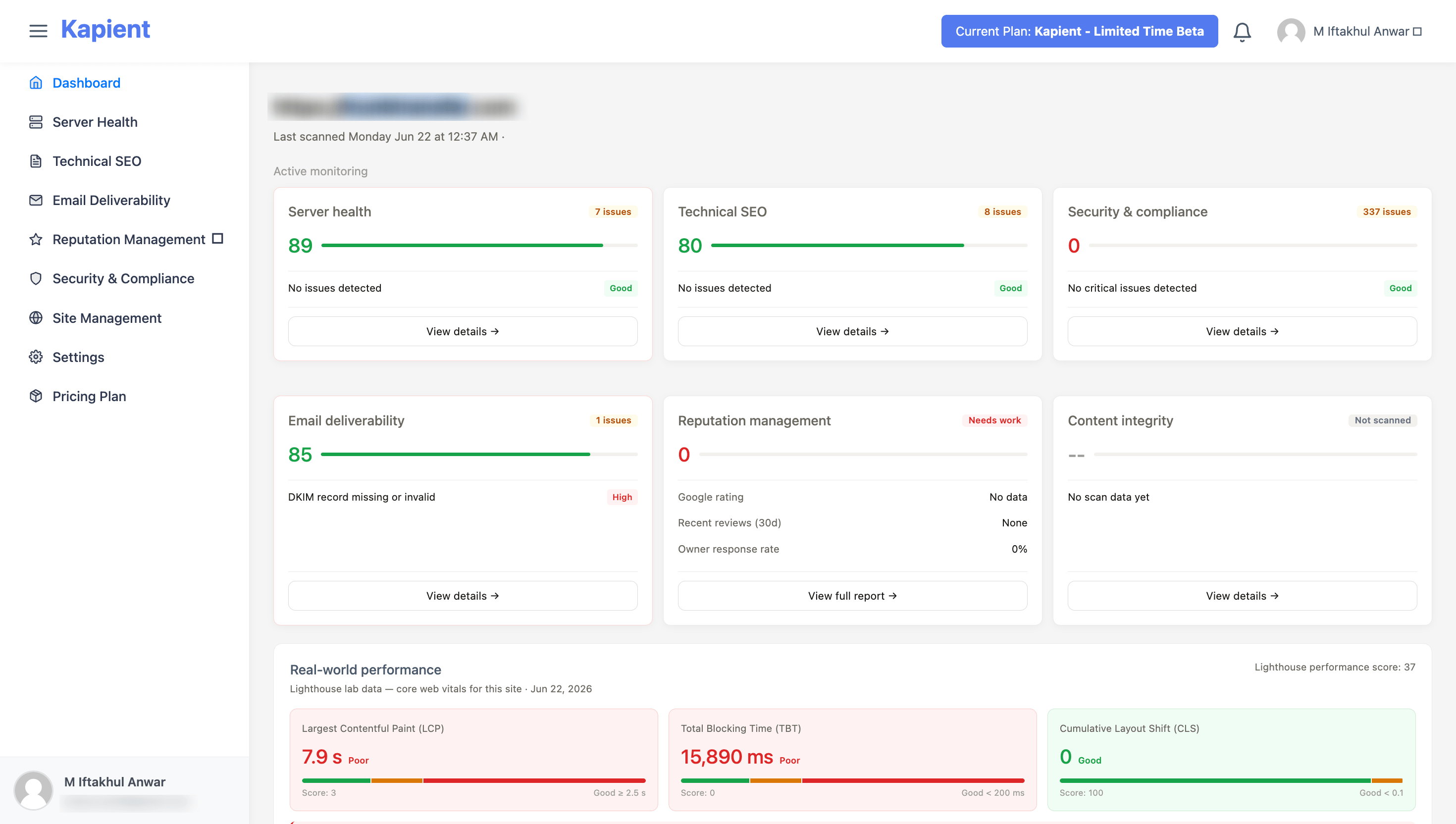
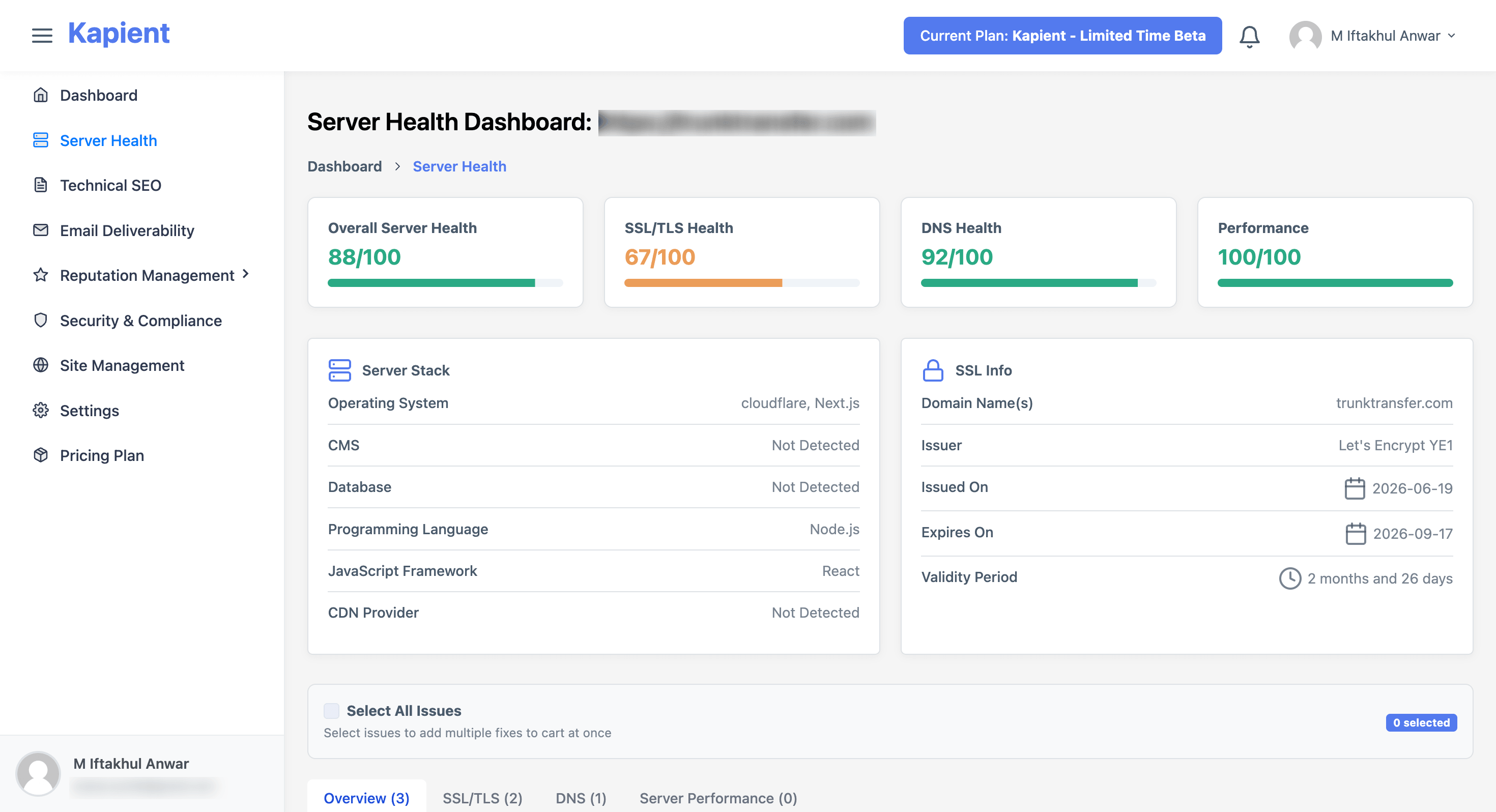
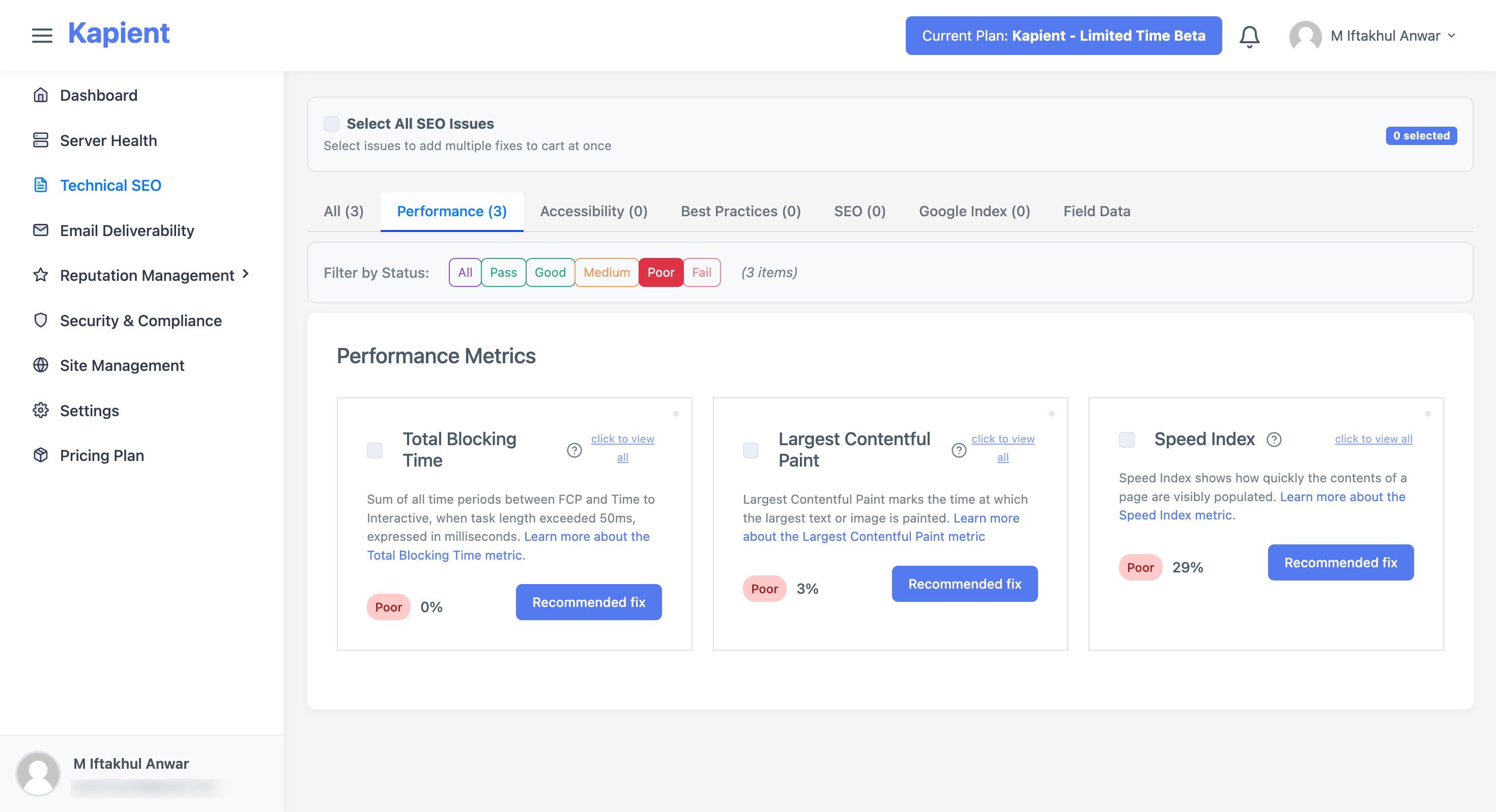
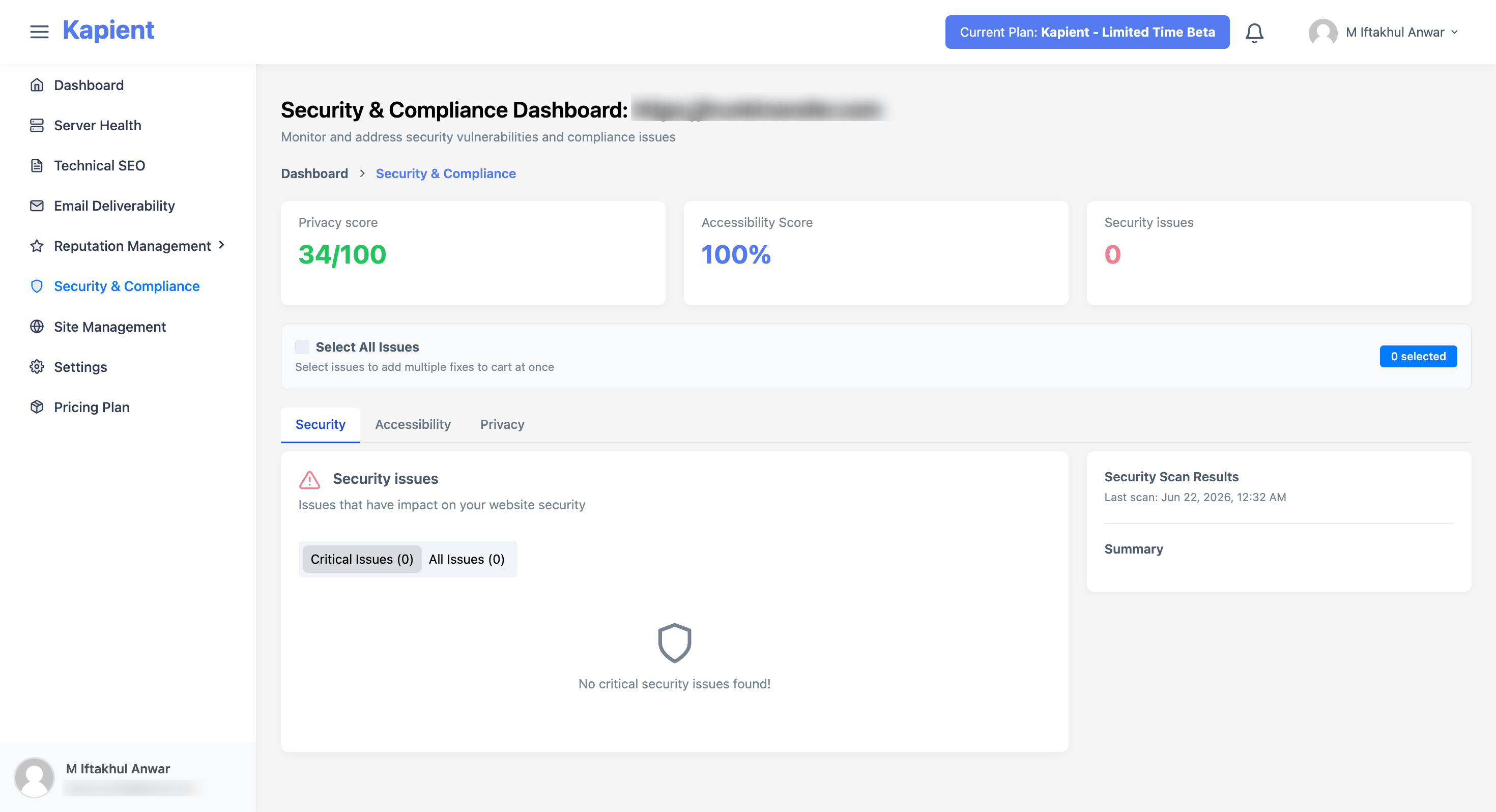
Kapient presents itself as website error monitoring software for people who need to catch silent failures before they turn into lost leads, lower trust, or weaker search performance. The public page leans hard into practical problems: broken forms, slow pages, expired certificates, DNS issues, and other issues that are easy to miss until the damage is already visible.
That makes it especially relevant for agencies, developers, and site owners who want a clearer picture of what is breaking behind the scenes. The Kapient homepage frames the product as a tool that gives easy-to-follow, non-technical instructions, which suggests it is aiming for users who need actionable guidance more than raw diagnostics.
Kapient appears most useful for people who are responsible for keeping a website commercially healthy, not just technically alive. That includes agencies managing client sites, developers supporting multiple builds, and site owners who care about forms, SEO, and trust signals as much as server status.
It also looks well suited to the kind of problems that are easy to ignore until they show up in revenue or reputation. The public page repeatedly points to broken contact forms, slow pages, expired SSL, and SEO-impacting errors, so the product seems aimed at users who want to stop small issues from becoming customer-facing problems.
For agencies, the white-label angle is probably the strongest commercial fit. The site suggests you can brand reports, catch issues before clients notice them, and use proactive maintenance as a service offering. That is a practical angle, but buyers should still verify how much of the workflow is configurable and whether the report format matches their own client process.
Kapient does not show a public pricing table on the pages I reviewed. What the site does make clear is that it positions itself as a service you can use for monitoring, alerts, and white-label partner work, rather than a one-off diagnostic tool.
If pricing matters for your decision, the most sensible next step is to check the Support page or the agency information before assuming the commercial model. For a tool like this, the useful question is not only cost, but whether the monitoring scope, report branding, and client-site limits align with how you operate.
The user experience appears designed to reduce setup friction. The site says setup takes minutes, not days, and that you can connect client sites and start monitoring without complex integrations. That should appeal to teams that want immediate coverage instead of another platform to configure.
Support is visible on the site through a dedicated Support page, which says users can contact the team directly and expect help. The public page also includes an agency section and a blog, so there are at least some routes for product guidance, though buyers who depend on fast response times should still verify how support is handled in practice.
Kapient is clearly built around continuous scanning, alerting, and issue detection across multiple checkpoints. The public page mentions source code, server performance, SEO, Google Business Listings, reviews, SSL, plugins, DNS, MX records, APIs, and other site-health factors.
The more interesting technical signal is that it tries to cover both infrastructure-level and customer-facing problems. That suggests a monitoring model that is broader than uptime alone, but the site does not spell out the full architecture, integrations, or API surface in a way that would let a technical buyer evaluate the implementation depth. If those details matter, it is worth checking the agency or support pages before treating it as a fit for managed-scale operations.
Pros
Cons
Kapient is a website error monitoring tool that looks for silent failures and gives easy-to-follow instructions for fixing them. The public page frames it around lost leads, slow pages, broken forms, and SEO-impacting issues.
It appears most useful for agencies, developers, and site owners who manage business-critical websites. The white-label messaging also suggests a strong fit for partners who want to offer proactive maintenance under their own brand.
The site highlights broken contact or quote forms, DNS and MX misconfigurations, third-party script and API failures, expired SSL or plugin conflicts, and SEO-related hidden errors. It also mentions Google Business Profile accuracy and review performance as part of the broader monitoring scope.
Kapient goes beyond uptime by focusing on the practical problems clients and customers notice first, such as forms failing, pages slowing down, or credentials expiring. That makes it more relevant for teams trying to protect leads and trust, not just server availability.
Check how the white-label reporting works, what the alerting cadence looks like, and whether the monitoring coverage matches your site stack. If you manage multiple sites, it is also worth confirming how scaling and account structure work before you commit.
Not in a clear plan table on the pages reviewed. If pricing is important, the safest next step is to check the support or agency pages for commercial details before assuming the service model.
Probably, yes. The site explicitly mentions SEO-impacting hidden errors, crawl-related issues, and rank-related consequences, so it seems designed to support both site health and search visibility.
Kapient looks like a practical monitoring tool for people who need to catch the kinds of website problems that actually cost money. Its strongest case is for agencies and site owners who want early warnings, clearer fixes, and a way to turn silent failure detection into client value.

Discover the Best AI Tools & SaaS Solutions

Build Trust with DR Checker

The One Startup : Navigate. Build. Grow.
Get your brand featured here
Discover similar products in the same category

## Introduction Honeyb is AI visibility software built for Answer Engine Optimization - the practice of monitoring and improving how brands appear in AI-generated answers. The platform tracks brand mentions, recommendation share, sentiment, and citation sources across eight AI engines (ChatGPT, Gemini, Claude, Perplexity, Google AI Mode, Google AI Overviews, Microsoft Copilot, and Grok) and delivers daily visibility scores with weekly recommendations. The core insight on the site is direct: when a buyer asks an AI for the best tool or vendor, the answer is a shortlist of three to five names, and there is no second page to climb. Honeyb gives marketing teams a way to see which shortlist they are on - and which ones they are not. ## Key Features - **AI Visibility Score** - a daily percentage showing how often the brand appears in AI answers, tracked against competitors over 7-day, 30-day, and 90-day windows - **Topic Performance** - visibility broken down by topic category (e.g., project management, team collaboration), showing where the brand appears and where it does not - **Citation Source Tracking** - domain-level breakdown of which sources (G2, Forbes, Reddit, Product Hunt, etc.) the AI models cite when mentioning the brand - **Sentiment and Risk Monitoring** - tracks whether AI mentions are positive, neutral, or negative, and flags emerging risks - **Competitor Benchmarking** - compare visibility and recommendation share against named competitors in each workspace - **Honeyb Recommendations** - weekly actionable suggestions on content, sources, and PR moves, ranked by estimated impact - **Workspace Organization** - group tracking by brand, product line, audience, market, or language, with separate competitors and citations per workspace - **Free AI Visibility Check** - enter a domain and get an instant visibility report across AI platforms without signing up ## Use Cases SEO and content teams can use Honeyb to understand which topics and source citations drive AI recommendations in their category, then adjust their content and PR strategy to improve visibility. The citation source breakdown shows whether review sites, editorial coverage, or forum mentions are doing the most work - which directly informs where to invest outreach effort. PR and brand teams tracking reputation across AI engines can monitor sentiment and risk signals daily, catching negative mentions or competitive displacement early. Because AI answers are concise and influential - the site notes that AI typically returns three to five names - a brand that disappears from the shortlist effectively ceases to exist for that buyer query. Global brands operating across multiple markets and languages can use workspaces to track visibility per region or product line, with separate competitor sets and citation tracking for each. The Full Spectrum and Enterprise tiers support multi-brand, multi-market, and multi-language monitoring in a single account. ## Pricing Honeyb offers four tiers with monthly or annual billing (20% discount on annual): - **The Minimum** - $29/month: 10 prompts daily, 1 AI engine of choice, 1 workspace, 1 seat, competitor tracking, citation tracking, Honeyb Recommendations, weekly email report, email support (no free trial) - **Multi-Model** - $79/month: 50 prompts daily, 3 engines of choice, up to 5 workspaces, unlimited seats, multi-brand/multi-market/multi-language tracking, 14-day free trial - **Full Spectrum** - $149/month: 100 prompts daily, all 8 engines (including Google AI Mode and AI Overviews), up to 10 workspaces, unlimited seats, monthly 30-minute visibility review with the Honeyb team, priority support, 14-day free trial - **Enterprise** - custom pricing: custom prompt volume (fair-use), all 8 engines plus new models on launch, unlimited workspaces and seats, custom prompt strategies built with the Honeyb team, white-label reporting, API access, SSO/SAML, audit logs, quarterly business review, dedicated account manager, dedicated Slack channel, priority onboarding The [pricing page](https://www.honeyb.ai/pricing) has full details and a plan-comparison table. ## User Experience and Support The dashboard centers on an AI Health Report with four panels: visibility score and trend, topic performance, top citation sources, and sentiment and risks. Users set up tracking in five steps: add prompts (the questions buyers ask), add competitors, choose AI models to track, view the daily visibility score, and act on weekly recommendations. Support varies by tier: email support on The Minimum and Multi-Model, priority support with monthly 30-minute reviews on Full Spectrum, and a dedicated Slack channel with account manager on Enterprise. All paid tiers above The Minimum include a 14-day free trial. The company is registered in Latvia (SIA Honeyb, Reg. Nr. 40203724531). ## Technical Details Honeyb runs as a web platform. It tracks eight AI engines: ChatGPT, Google AI Mode, Google AI Overviews, Microsoft Copilot, Perplexity, Gemini, Grok, and Claude. Workspaces organize tracking by brand, product line, audience, market, or language, with a minimum of 10 prompts per workspace. The Enterprise tier adds API access, SSO/SAML authentication, audit logs, and white-label reporting. The site mentions Slack integration for the Enterprise tier's dedicated channel. No browser extension or CMS plugin is listed. ## Pros and Cons **Pros** - Addresses a real gap: most marketing teams cannot see what AI models tell buyers about their brand - Tracks eight AI engines including Google AI Mode and AI Overviews, which are emerging search surfaces - Citation source breakdown shows exactly which external content drives AI recommendations - Workspace model supports multi-brand, multi-market, and multi-language tracking - Free visibility check requires no sign-up, lowering the barrier to first insight - Weekly recommendations turn monitoring data into actionable next steps **Cons** - The Minimum tier has no free trial, which may discourage testing at the entry level - Prompt-based tracking means users must define the questions to monitor; coverage depends on prompt quality - Pricing starts at $29/month for a single engine, which may feel steep for small brands testing one model - Enterprise pricing is not publicly listed ## FAQ ### What is Honeyb and what problem does it solve? Honeyb is AI visibility software for Answer Engine Optimization. It tracks how brands appear in AI-generated answers across ChatGPT, Gemini, Claude, Perplexity, and other AI engines. The problem it addresses: when buyers ask AI for recommendations, the answer is a shortlist of three to five names, and brands that do not appear effectively do not exist for that query. ### How does Honeyb differ from traditional SEO tools? Traditional SEO tools track rankings in search engine result pages with ten blue links. Honeyb tracks visibility in AI-generated answers, which return a small set of names rather than a ranked list. The site FAQ addresses this comparison directly. ### What is a workspace in Honeyb? A workspace is a grouping for tracking - one per brand, product line, audience, market, or language. Each workspace has its own competitors, citations, and recommendations. The minimum is 10 prompts per workspace. ### Does Honeyb offer a free trial? The Minimum tier does not include a free trial. Multi-Model, Full Spectrum, and Enterprise all include a 14-day free trial. There is also a free AI visibility check that does not require sign-up. ### What AI engines does Honeyb track? Honeyb tracks eight engines: ChatGPT, Google AI Mode, Google AI Overviews, Microsoft Copilot, Perplexity, Gemini, Grok, and Claude. The Minimum tier covers one engine, Multi-Model covers three, and Full Spectrum and Enterprise cover all eight. ### Can I switch tiers later? Yes. The site FAQ confirms that users can switch between tiers as their monitoring needs change. ## Conclusion Honeyb targets a problem that most marketing teams have not yet instrumented: understanding what AI models tell buyers about their brand. The daily visibility score, citation source breakdown, and weekly recommendations turn an invisible channel into a measurable one. The free visibility check is a practical entry point, and the workspace model scales from a single-engine monitor to multi-brand, multi-market tracking. For teams that want to see - and improve - their position in AI-generated answers, the [Honeyb site](https://www.honeyb.ai/) is the place to start.